Add Comments
A comment is not a property of a paragraph. It lives in its own part of the document package and is tied to the body by a pair of range markers, so adding one means opening a range, adding the runs it should cover, and closing it again. UniOffice exposes that as three calls, plus a fourth for replies.
| Call | What it does |
|---|---|
para.AddComment(author, text) | Creates the comment and appends a range-start marker at the current end of para. Returns the new comment’s ID. |
para.CloseComment(id) | Appends the matching range-end marker and the reference run at the current end of para. |
doc.Comment(id) | Looks the comment up again so you can reply to it or resolve it. |
comment.AddReply(author, text) | Adds a reply, producing a thread Word displays as connected. |
Both markers append to whatever the paragraph already holds, which is what
decides the covered range. Runs added between the two calls are inside the
comment; runs added before AddComment or after CloseComment are outside it.
Close on a later paragraph and the range spans everything in between.
Adding a comment
doc := document.New()
defer doc.Close()

para := doc.AddParagraph()
cmID := para.AddComment("UniOffice User", "This is comment")

para.AddRun().AddText("Lorem")
para.CloseComment(cmID)

root := doc.Comment(cmID)
if _, err := root.AddReply("Reviewer One", "I agree, this should be simplified."); err != nil {
    return err
}
root.SetDone(true)
The ID is assigned by the library, not chosen by you: it is one past the highest ID already in the document, starting at 1. Author initials are derived from the author name and the comment date is set to the current time, so neither needs passing in.
doc.Comment(id) returns a zero-value Comment when no comment carries that
ID rather than reporting a miss, and AddReply on that value fails with
invalid comment.
Limitations
AddReply requires the thread root’s range to be closed first, because the
reply’s own markers are inserted next to the root’s. Calling it before
CloseComment returns comment anchor not found; the comment range may not be closed (Paragraph.CloseComment) or is anchored in an unsupported part. Anchors
are looked for in the body, table cells, headers, footers, footnotes and
endnotes; a comment anchored anywhere else cannot be replied to.
Word threads are flat. reply.AddReply(...) walks up to the thread root and
attaches there, so the result is a second reply alongside the first rather than
a nested one.
The markers can only be appended, never inserted. There is no call that wraps a comment range around runs already sitting in the middle of a paragraph, so the comment boundaries have to be planned while the paragraph is being built.
SetDone writes the resolved flag into commentsExtended.xml and registers a
durable ID in commentsIds.xml, creating both parts if the document does not
have them yet.
Run the example
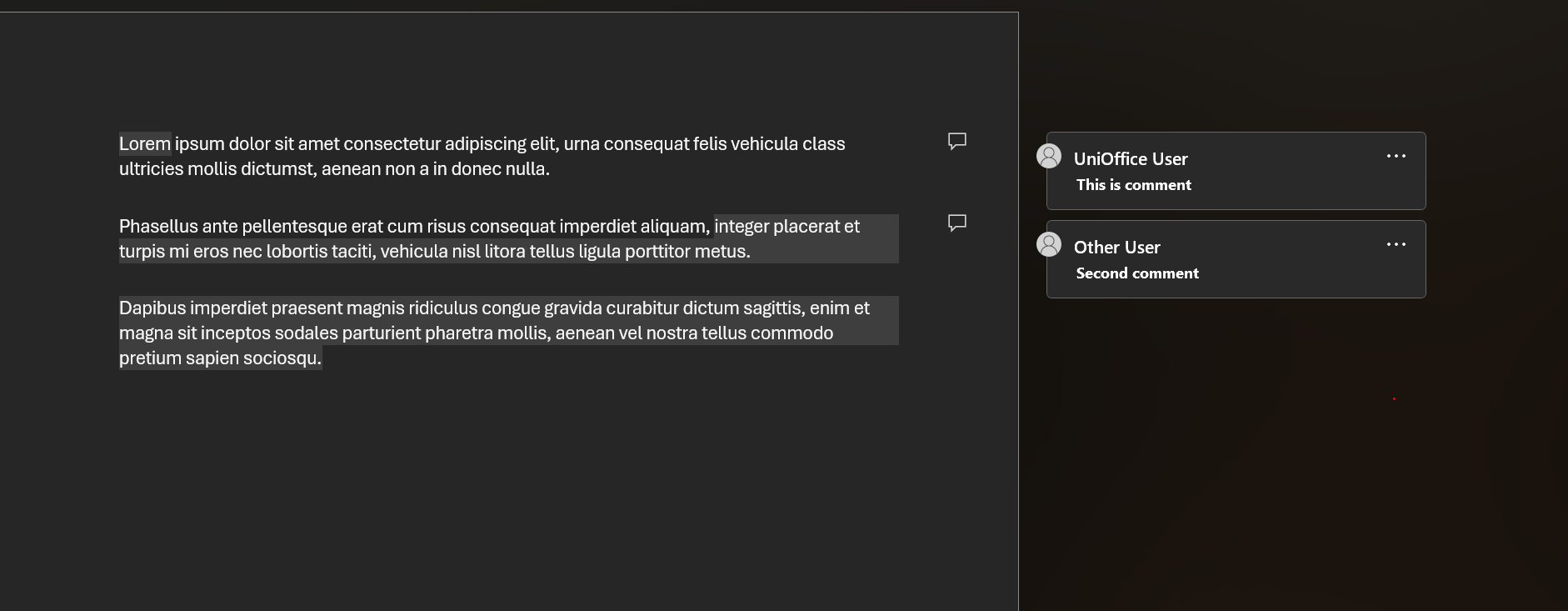
The example builds a three-paragraph document with two comments. The first
covers a single word and carries a two-message thread marked resolved; the
second opens partway through a paragraph and closes in the paragraph after it,
which is the multi-paragraph range case. Output is
simple_doc_with_comment.docx.
git clone https://github.com/unidoc/unioffice-examples.git
cd unioffice-examples/document/comment
go run main.go
If this is your first time using UniOffice, follow the getting started guide to create an API key and set up your development environment.
View the full source
Sample output
The two anchored ranges are shaded in the body, with the comments listed in the review pane.