Simple Example
Three types carry nearly everything in a Word document. A Document holds
paragraphs, a paragraph holds runs, and a run is a stretch of text that shares
one set of formatting. Turning three words bold in the middle of a sentence
therefore means splitting the sentence into three runs, not setting a property
on the paragraph. Everything else in this section is a variation on that
nesting.
Formatting is split the same way:
| Set on | Reached through | Controls |
|---|---|---|
| Paragraph | para.Properties() | Alignment, indentation, spacing, numbering level, keep-with-next and page-break behavior. |
| Run | run.Properties() | Bold, italic, size, color, font family, underline, highlight, small caps and the rest of the character effects. |
Several of the paragraph settings also exist directly on Paragraph itself, so
para.SetFirstLineIndent(x) and para.Properties().SetFirstLineIndent(x) write
the same XML. Use whichever reads better.
Build a document
doc := document.New()
defer doc.Close()

para := doc.AddParagraph()
para.SetStyle("Title")
para.AddRun().AddText("Simple Document Formatting")

run := doc.AddParagraph().AddRun()
run.Properties().SetBold(true)
run.Properties().SetSize(15)
run.Properties().SetColor(color.Red)
run.AddText("A run is a string of characters with the same formatting.")

if err := doc.SaveToFile("simple.docx"); err != nil {
    log.Fatal(err)
}
Body content appears in the order you add it. InsertParagraphBefore and
InsertParagraphAfter take a paragraph you already hold and place a new one
relative to it, which is what you need when you are editing rather than
building.
SetSize(15) means 15 points, because measurement.Point is 1 and every
distance in the API is a measurement.Distance. Anything else is written as a
multiple: 0.5 * measurement.Inch, 10 * measurement.Millimeter. The
conversion to twips, half-points or EMUs happens inside the setter.
Page size, margins and headers are untouched here, so the document gets Word’s defaults. Those live on the body section; see page layout.
Styles
SetStyle takes a style ID, not the display name from Word’s Styles gallery,
and the ID is written straight into the paragraph without being checked against
the document’s style table. A typo produces an unstyled paragraph and no error.
Styles.SearchStyleById and SearchStyleByName are there if you want to
confirm one exists first.
A document from document.New() starts with the set installed by
Styles.InitializeDefault: Normal, Title, Heading1 through Heading9,
TableNormal, NoList, plus the linked character styles such as TitleChar.
Anything beyond that you define yourself or inherit from a template you opened.
Limitations
A metered license key has to be set before the document is saved. Without one,
Save and SaveToFile return unioffice license required and write nothing,
which is why every example carries an init calling license.SetMeteredKey.
The list at the end of the example works off doc.Numbering.Definitions()[0].
That index is safe only because document.New() installs one default numbering
definition; a document from document.Open() may have no numbering part at all,
in which case Definitions() returns an empty slice and indexing it panics.
That default definition is bullet-formatted with an empty level text, so the
four Level N paragraphs come out indented with no visible marker. For real
bullets and numbers, define your own and see
bullets and numbering.
Indent setters treat measurement.Zero as a request to remove the attribute
rather than write a zero, so you cannot use them to override an inherited indent
back to nothing.
defer doc.Close() deletes the temporary directory created when a document is
read from disk. On a document from document.New() there is nothing to remove
and the call does nothing, but keep it; the same code usually grows an
Open call later.
Where to go next
Text formatting past the run properties shown here is in text, and the other content types have their own groups: tables, images, links and navigation and forms. If you are working on a file that already exists rather than building one, start at find and edit content.
Run the example
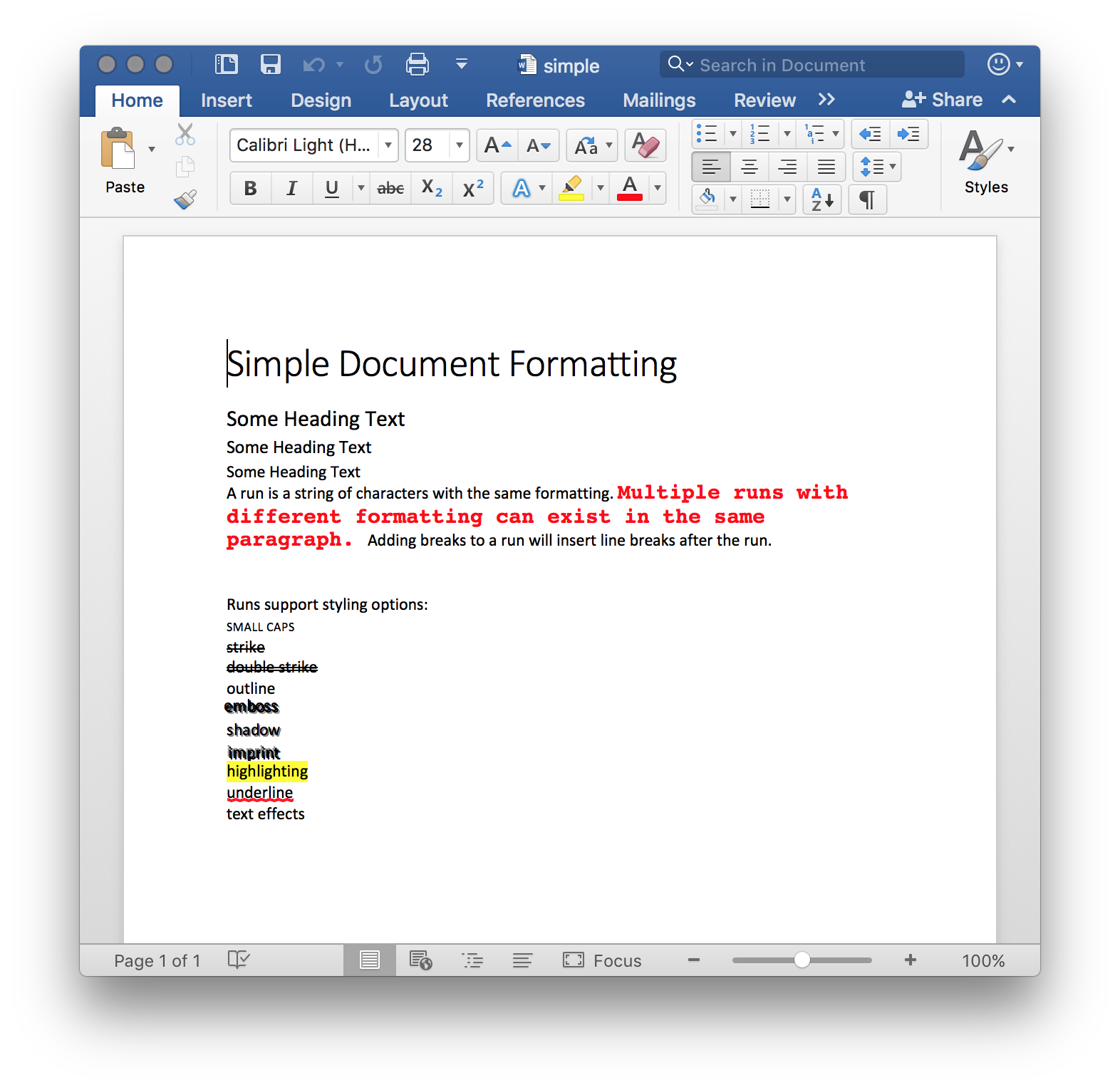
The example builds one page: a title, three heading levels, a paragraph showing
two runs with different formatting, then one run per character effect. The
createParaRun helper exists only to keep that last part short.
git clone https://github.com/unidoc/unioffice-examples.git
cd unioffice-examples/document/simple
go run main.go
If this is your first time using UniOffice, follow the getting started guide to create an API key and set up your development environment.
View the full source
Sample output