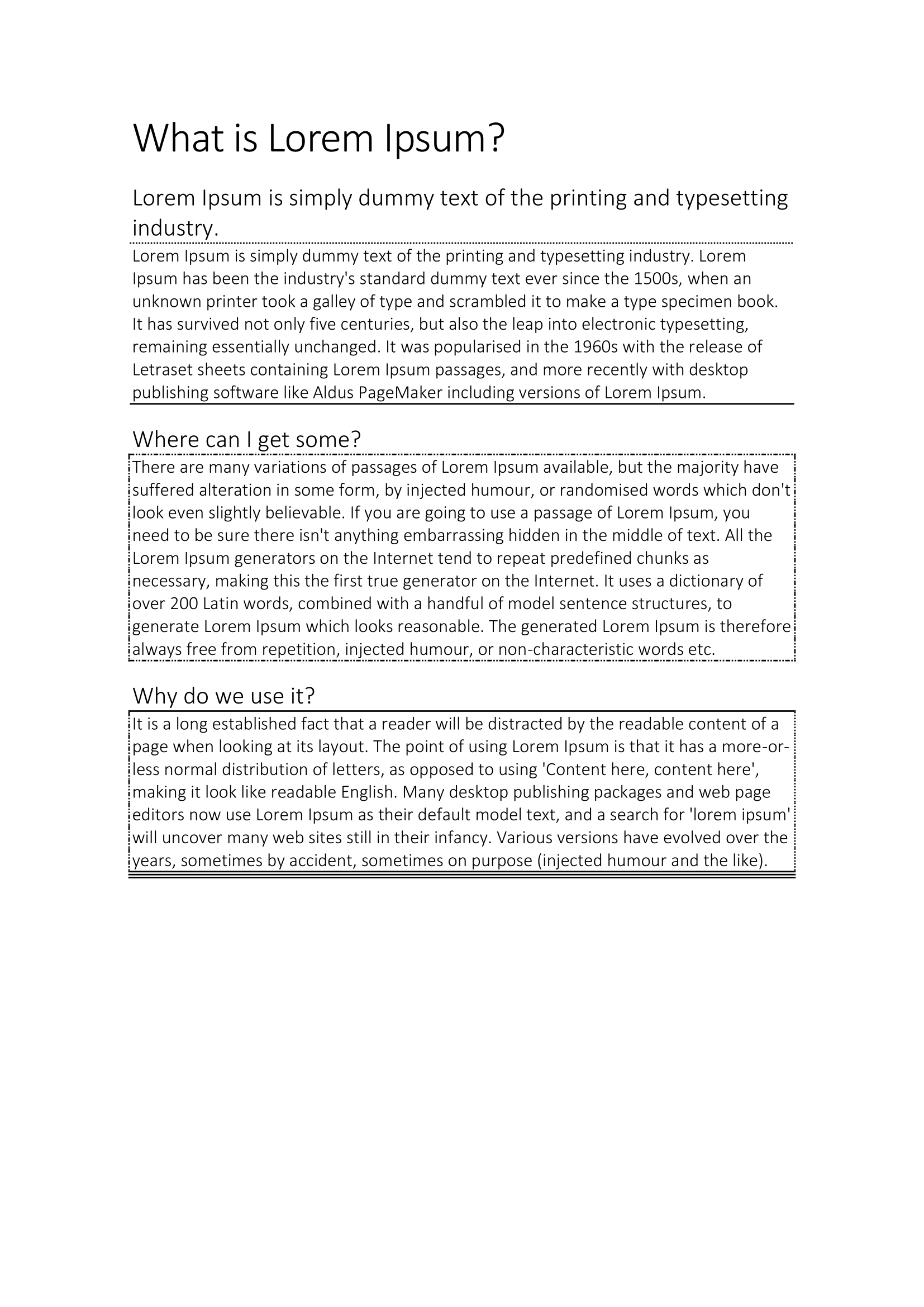
Paragraph Borders
Paragraph borders draw lines on any of the four edges of a paragraph, which is
how you get a rule under a heading or a box around a callout without resorting
to a single-cell table. para.Borders() returns the ParagraphBorders object;
every setter on it takes the same three arguments, a line style, a color and a
thickness.
The edges
| Call | Edge |
|---|---|
SetTop, SetBottom, SetLeft, SetRight | One edge each. |
SetAll | All four, by calling the four above in turn. |
SetBetween | The w:between border, which Word draws between adjacent paragraphs that carry the same border settings rather than at the outside of each. |
SetAll replaces each edge rather than filling in the unset ones, so call it
first and then override individual edges. Doing it the other way round throws
your per-edge settings away silently.
The line style comes from wml.ST_Border, which runs to well over a hundred
values. The plain ones come first: ST_BorderSingle, ST_BorderDouble,
ST_BorderDotted, ST_BorderDashed, ST_BorderThick, ST_BorderTriple,
ST_BorderWave. Everything after those is Word’s decorative border art.
Passing ST_BorderNone or ST_BorderNil is how you turn an edge off; there is
no remove method.
Doing it
para := doc.AddParagraph()
para.SetStyle("Heading1")
para.AddRun().AddText("Where can I get some?")

para.Borders().SetBottom(wml.ST_BorderSingle, color.Auto, 1*measurement.Point)
color.Auto writes w:color="auto", which lets Word pick a color that contrasts
with the page. Any color.Color works instead, including the named values in
the color package such as color.Red and anything built with color.RGB.
Limitations
Thickness is a measurement.Distance, but it is stored in eighths of a point
and clamped. Anything under 0.25 points becomes 0.25 points, anything over 12
points becomes 12 points, and a thickness of zero or less leaves the size
attribute off entirely so Word falls back to its own default. Requesting a
hairline and requesting 40 points both give you something other than what you
asked for, with no error.
Borders() operates on the paragraph, not on a style. To put a border on every
paragraph of a style you have to set it per paragraph, or edit the style’s XML
through Style.X().
There is no getter. ParagraphBorders exposes X() for the underlying
wml.CT_PBdr and nothing else, so reading back an existing document’s borders
means walking that struct yourself.
Run the example
The example builds a lorem ipsum page and puts a different border treatment on
each body paragraph: a dotted rule under a heading, a single rule under a
paragraph, a dot-dot-dash box via SetAll, and finally four edges each set to a
different style. The final block is the one to read if you want to see how the
per-edge calls compose.
git clone https://github.com/unidoc/unioffice-examples.git
cd unioffice-examples/document/paragraph-borders
go run main.go
If this is your first time using UniOffice, follow the getting started guide to create an API key and set up your development environment.
View the full source
Sample output