Borders
A border in the OOXML spreadsheet format belongs to a single cell, not to a
range. StyleSheet.AddBorder returns a Border describing the four edges and
the diagonal of one cell, and a CellStyle carries a reference to it. To put a
box around a block of cells you need different styles on the corners, the sides
and the interior, which is what Sheet.SetBorder does for you.
| Call | What it borders |
|---|---|
CellStyle.SetBorder(b) | Every cell that style is assigned to, on all four edges plus the diagonal. |
Sheet.SetBorder("B6:D10", b) | The outside of a range. Splits b into corner and edge pieces and assigns new styles to the perimeter cells. |
Reach for CellStyle.SetBorder when each cell should be boxed individually, as
in a grid of ruled cells. Reach for Sheet.SetBorder when you want one outline
around a region and nothing drawn inside it.
cs := ss.StyleSheet.AddCellStyle()

b := ss.StyleSheet.AddBorder()
b.SetLeft(sml.ST_BorderStyleThin, color.Blue)
b.SetRight(sml.ST_BorderStyleThin, color.Blue)
b.SetTop(sml.ST_BorderStyleThin, color.Blue)
b.SetBottom(sml.ST_BorderStyleThin, color.Blue)
cs.SetBorder(b)

sheet.Cell("C4").SetStyle(cs) // one boxed cell
sheet.SetBorder("B6:D10", b)  // outline around a range
sml is github.com/unidoc/unioffice/v2/schema/soo/sml and color is
github.com/unidoc/unioffice/v2/color. Order does not matter between the two
halves: you can configure the border before or after attaching it to a style,
because SetBorder stores a pointer.
An edge you never set carries ST_BorderStyleUnset and draws nothing, so a
three-sided border is just a matter of leaving one setter out. The style
constants run from ST_BorderStyleThin through ST_BorderStyleThick,
ST_BorderStyleDouble, ST_BorderStyleHair and the dash and dot-dash
variants. SetDiagonal takes two extra booleans for the up and down diagonals,
so a single call can draw one line, both, or neither.
Limitations
Sheet.SetBorder copies only the top, left, right and bottom edges into the
styles it builds. A diagonal set with SetDiagonal is dropped, which is why the
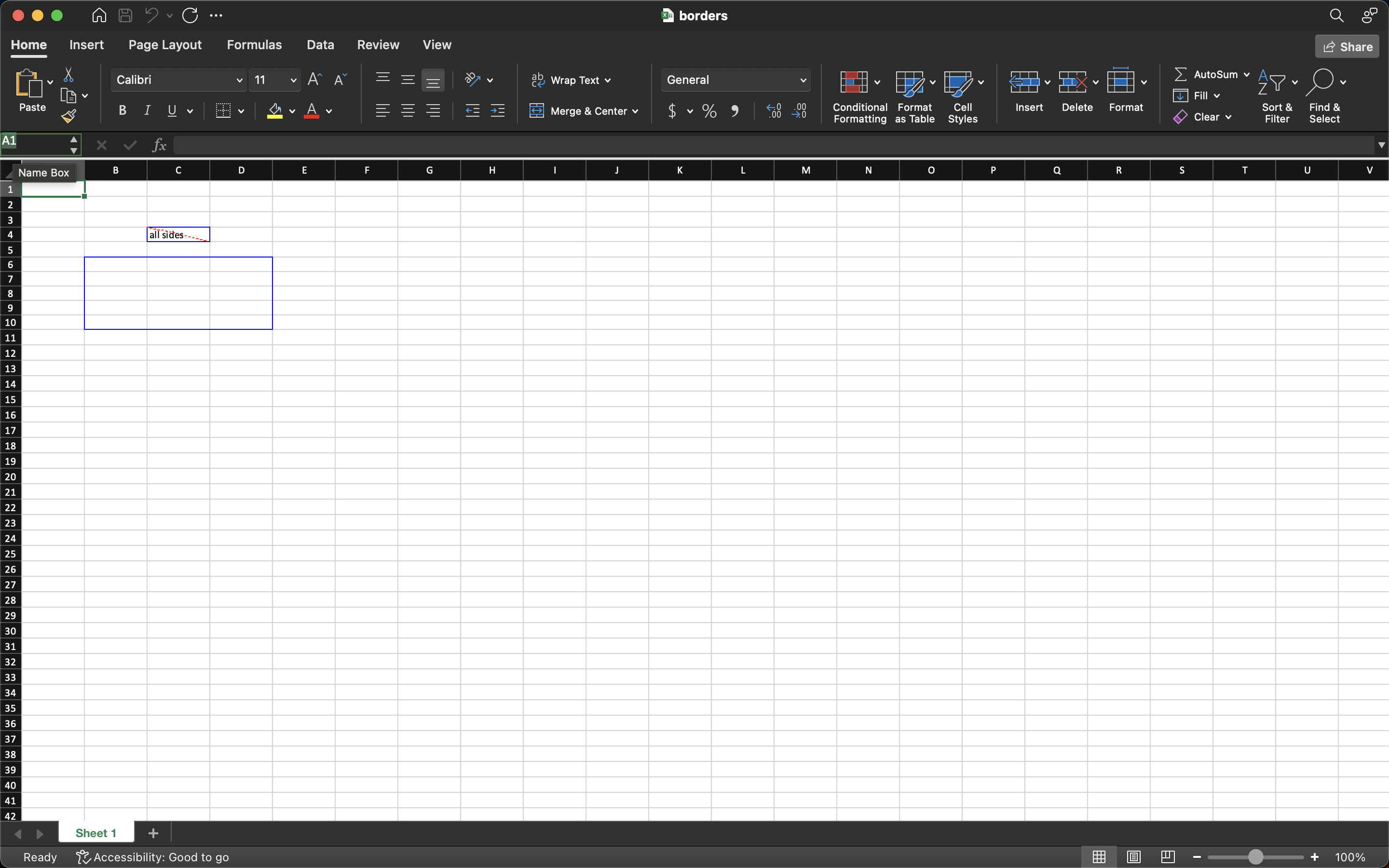
example’s red dashed diagonal shows on C4 and not on the B6:D10 block.
It also calls Cell.SetStyle on each perimeter cell, replacing whatever style
those cells already carried. Number formats, fonts and fills applied earlier are
lost. Call Sheet.SetBorder first and apply the rest afterwards, or reapply
them once the outline is drawn.
Cells inside the range get nothing. Only the perimeter is styled, so a grid of internal rules needs a per-cell style.
Every call adds eight cell styles and eight borders to the workbook. Calling it in a loop over hundreds of rows inflates the stylesheet; build one style and assign it repeatedly instead.
The only error Sheet.SetBorder returns comes from ParseRangeReference, so it
tells you the range was malformed and nothing else.
Run the example
The example boxes C4 on its own with all four edges plus a diagonal, then
draws the same border around B6:D10 so you can compare the two mechanisms
side by side.
git clone https://github.com/unidoc/unioffice-examples.git
cd unioffice-examples/spreadsheet/borders
go run main.go
If this is your first time using UniOffice, follow the getting started guide to create an API key and set up your development environment.
View the full source
Sample output