Number and Date Formats
A cell stores a number. Whether that number reads as 1234.5, $1,234.50, 95% or
a date is decided by the number format on the cell’s style, and the two are set
independently. SetNumber writes the value; nothing about it says how to
display it. This is the single most common source of confusion with spreadsheet
output, because a date with no number format renders as a five-digit integer and
looks like corrupted data.
| Call | When to use it |
|---|---|
cell.SetNumber(v) | Value only. The cell inherits whatever format its style carries, which by default is General. |
cell.SetNumberWithStyle(v, spreadsheet.StandardFormatPercent) | A one-off cell. Finds or creates a style holding that standard format and assigns it. |
cs.SetNumberFormatStandard(f) | A style you will reuse, taken from the ECMA 376 built-in list. |
cs.SetNumberFormat("$#,##0.00") | A style with a format code of your own. |
cell.SetDateWithStyle(t) | A date that should read as a date. |
cell := row.AddCell()
cell.SetDateWithStyle(time.Now())

// A style built once and reused.
money := ss.StyleSheet.AddCellStyle()
money.SetNumberFormat("$#,##0.00")

cell = row.AddCell()
cell.SetNumber(1234.5)
cell.SetStyle(money)
SetNumberFormat deduplicates: give it a format code the workbook already has
and it reuses the existing entry rather than adding another. Custom format IDs
start at 200 so they cannot collide with the built-in ones.
How dates are stored
A date is a number of days since the workbook epoch, which is 1899-12-30. There
is no date type in the file. SetDate(time.Now()) writes something like 46247
into the cell, and if the cell’s style has no date format that is exactly what
you see.
SetDate truncates to a whole day. SetTime keeps the fractional part, so
46247.895833333333333 is the same day at 21:30. Neither call applies a style.
SetDateWithStyle is SetDate plus a lookup for a style carrying
StandardFormatDate, creating one if the workbook has none, and it is what you
want unless you are supplying your own format.
Reading back, GetFormattedValue reproduces what a spreadsheet application
would display and GetValueAsTime returns the underlying time.Time.
GetValueAsTime requires the cell type to be unset, which is the state
SetDate and SetTime leave it in. A value written with SetNumber has the
number type and GetValueAsTime refuses it.
Limitations
CellStyle.Index() returns 0 until the style has been assigned to something.
AddCellStyle builds the style detached from the workbook, and it is
Cell.SetStyle or Column.SetStyle that registers it and gives it a real
index. Taking the index straight after creating the style yields 0, the default
style, so SetStyleIndex(0) leaves the cell in the General format with no
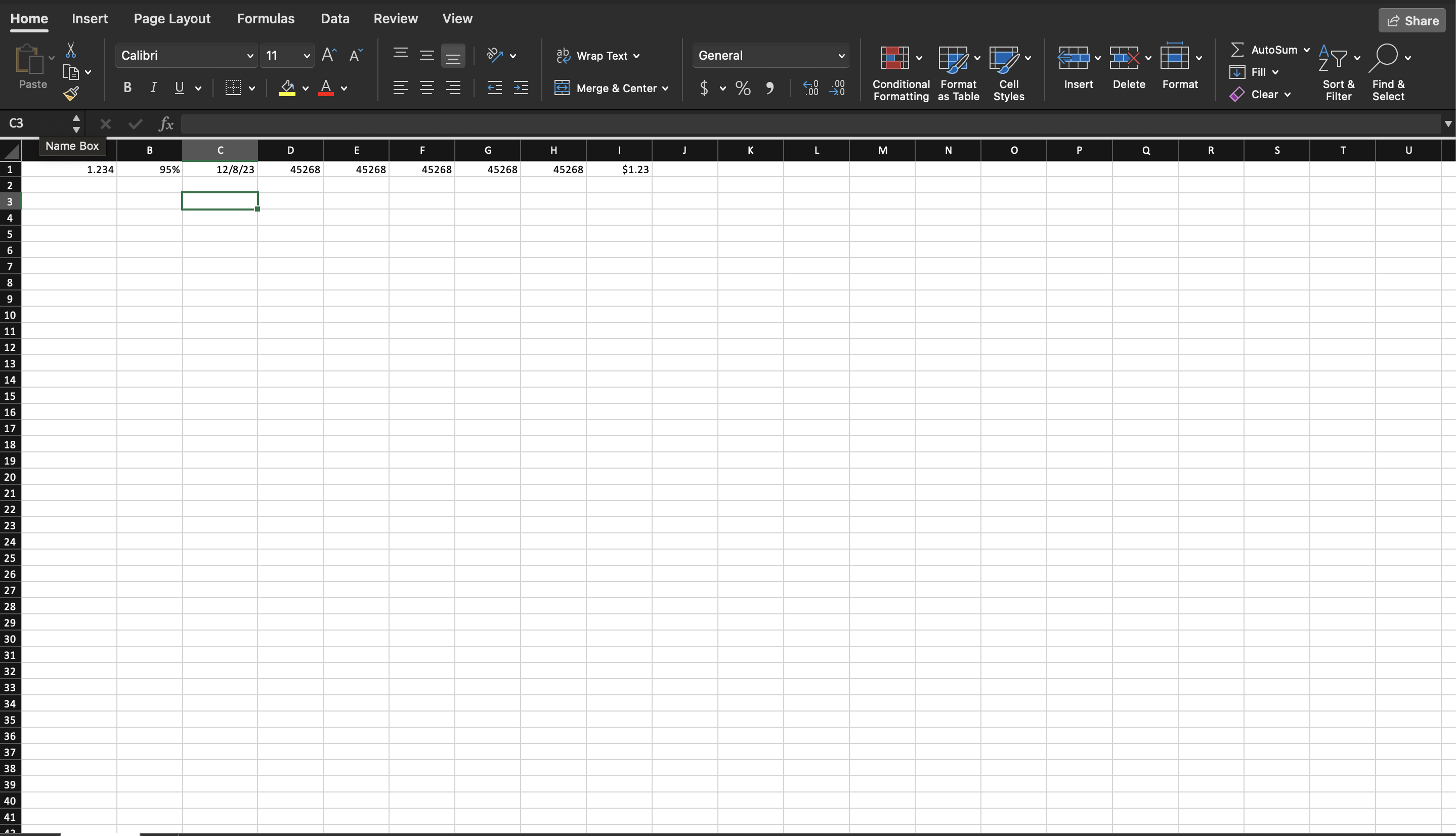
error anywhere. The embedded example does this for its run of time cells, which
is why they come out as raw serial numbers. If you want the speed of assigning
by index, assign the style to the first cell with SetStyle, then read
Index() for the rest:
cs := ss.StyleSheet.AddCellStyle()
cs.SetNumberFormatStandard(spreadsheet.StandardFormatTime)

first := row.AddCell()
first.SetDate(time.Now())
first.SetStyle(cs)

idx := cs.Index() // now a real index
for i := 0; i < 4; i++ {
    cell := row.AddCell()
    cell.SetDate(time.Now())
    cell.SetStyleIndex(idx)
}
Dates before the epoch are dropped in silence. SetDate and SetTime log a
debug message and return without writing anything, leaving the cell empty, so a
1899 date produces a blank rather than an error.
Workbook.Epoch() always returns 1899-12-30, including for workbooks flagged as
using 1904 dates. Reading a 1904-based workbook shifts every date by four years
and a day.
Styles are shared, so changing a number format after assigning the style changes every cell already using it. Set the format before you assign, not after; see the section overview for why mutating an assigned style is unreliable in both directions.
Run the example
The example puts one row of cells side by side: an unformatted number, a
percentage set with SetNumberWithStyle, a date, a run of time cells assigned
by index, and a number with a custom currency format.
git clone https://github.com/unidoc/unioffice-examples.git
cd unioffice-examples/spreadsheet/number-date-time-formats
go run main.go
If this is your first time using UniOffice, follow the getting started guide to create an API key and set up your development environment.
View the full source
Sample output