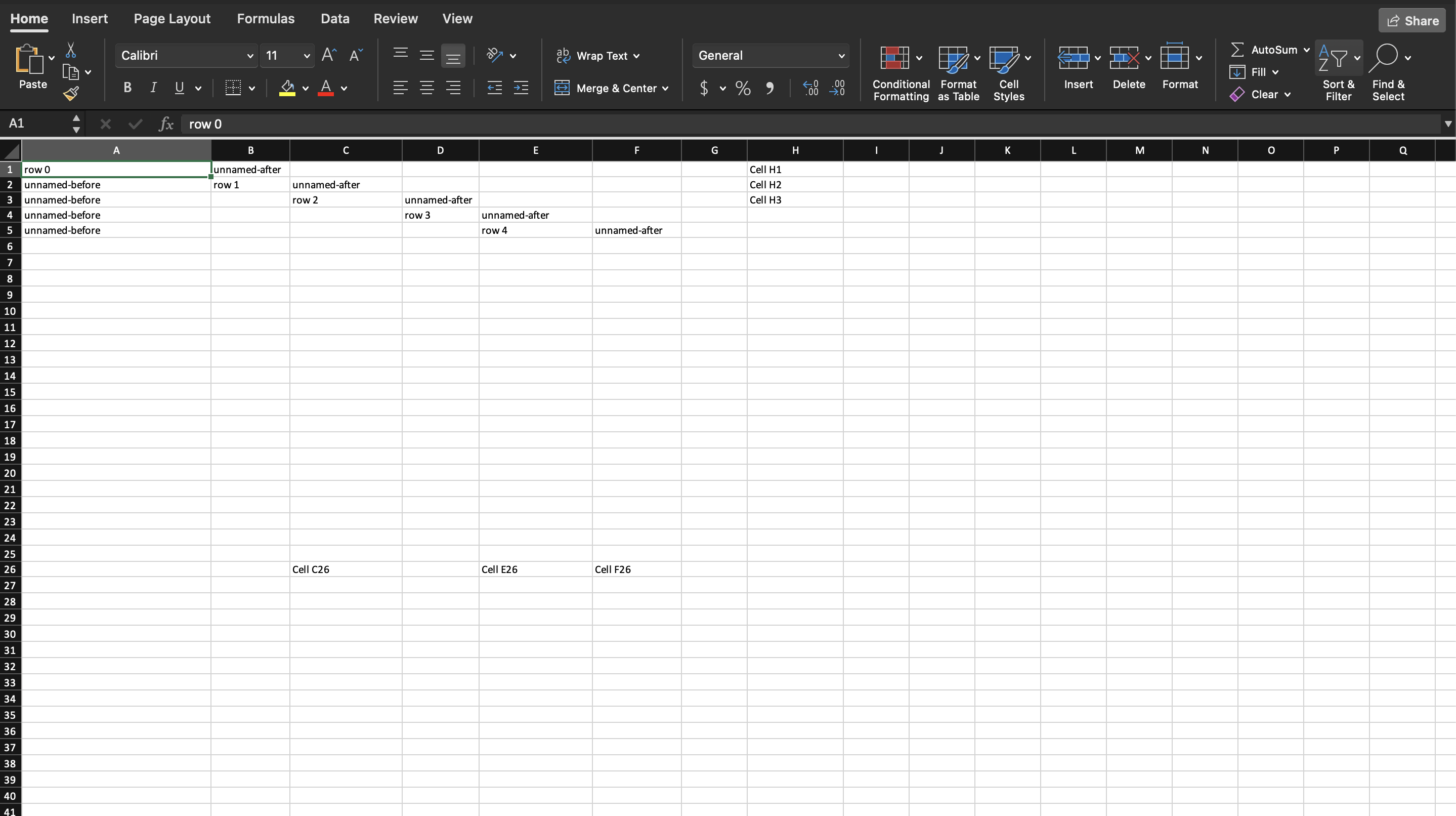
Address Cells by Column
A named cell in UniOffice is a cell created with an explicit column letter, so
that it lands in column C whether or not anything occupies A and B. It has
nothing to do with defined names, the feature that lets a formula say TaxRate
instead of $B$4; that one is in Name a Cell Range.
Which call to use depends on whether you are appending or addressing.
| Call | Where the cell goes | If it already exists |
|---|---|---|
row.AddCell() | the next free column in the row | n/a |
row.AddNamedCell("C") | column C | adds a second C, which fails validation |
row.Cell("C") | column C | returns the existing cell |
sheet.Cell("C26") | column C of row 26 | returns the existing cell, creating the row if needed |
Cell is the one to reach for. AddNamedCell exists because Cell has to scan
the row to see whether the cell is already there, which is worth avoiding when
you are writing a sheet you know is empty, and it is what Cell calls once it
has established that the cell is new.
sheet.AddNumberedRow(26).AddNamedCell("C").SetString("Cell C26")

// Row returns the existing row 26 rather than adding a second one.
sheet.Row(26).AddNamedCell("E").SetString("Cell E26")
sheet.Row(26).Cell("F").SetString("Cell F26")

// Or address the cell directly, which creates the row if it has to.
sheet.Cell("H1").SetString("Cell H1")
Rows follow the same split. AddNumberedRow(26) always adds a row, Row(26)
returns the existing row 26 or adds it. Calling AddNumberedRow twice with the
same number produces two rows with the same number, and Validate reports
reused row 26.
Mixing named and unnamed cells in one row works and is worth understanding,
because AddCell takes the next column after the highest one used so far. Add
the named cell first and the unnamed cell that follows lands immediately after
it. Add the unnamed cell first and it takes column A, so a subsequent
AddNamedCell("A") collides with it and Validate reports reused cell A1.
Limitations
Nothing about this is checked when you write it. Both duplicate cases produce a
workbook that looks fine in memory and fails at Validate, which is the last
chance before a file Excel refuses to open. Call Validate before SaveToFile,
and treat its error as fatal rather than logging it.
AddNamedCell takes column letters only, not a full reference. Passing "C27"
where "C" was meant yields a cell whose reference is the nonsense
C2726 in row 26, and that does not fail validation.
Run the example
The example builds five rows, each with an unnamed cell, then a named cell at a different column, then another unnamed cell, so you can see where each one lands. Row 26 is then built three different ways, and the last three cells are addressed straight from the sheet.
git clone https://github.com/unidoc/unioffice-examples.git
cd unioffice-examples/spreadsheet/named-cells
go run main.go
If this is your first time using UniOffice, follow the getting started guide to create an API key and set up your development environment.
View the full source
Sample output