Sort and Filter
Sorting and filtering look like a pair but work nothing alike. SetAutoFilter
writes a range into the file and leaves the data exactly where it is, so the
reader gets dropdown arrows on the header row and does the filtering themselves.
Sort has no file-format equivalent, so UniOffice reorders the rows on disk and
rewrites their references.
| Call | Effect on the data | Effect in Excel |
|---|---|---|
SetAutoFilter("A1:C6") | None | Filter dropdowns on the header row of that range |
ClearAutoFilter() | None | Dropdowns removed |
Sort("C", 2, order) | Rows physically reordered and renumbered | Nothing; the file already arrived sorted |
Filtering and sorting a sheet
sheet := ss.AddSheet()
hdr := sheet.AddRow()
hdr.AddCell().SetString("Product Name")
hdr.AddCell().SetString("Quantity")
hdr.AddCell().SetString("Price")

// The range covers the header and all five data rows.
sheet.SetAutoFilter("A1:C6")

// ... add the data rows ...

// Sort by price, descending, starting at row 2 so the header stays put.
sheet.Sort("C", 2, spreadsheet.SortOrderDescending)
The autofilter range has to cover the whole block being filtered, header
included, not just the header row. Getting this wrong is the usual reason a
filter dropdown appears but sees no data. Dollar signs are stripped from the
range, so "$A$1:$C$6" and "A1:C6" are the same call. Each sheet has one
autofilter; a second SetAutoFilter replaces the first rather than adding to it.
SetAutoFilter also writes a reserved defined name, _xlnm._FilterDatabase,
scoped to the sheet. ClearAutoFilter removes both the filter and that name.
Sort takes a column letter, a 1-based first row and a
spreadsheet.SortOrderAscending or SortOrderDescending. The first row
argument is what keeps a header out of the sort; pass 1 and the header is
sorted along with everything else.
How rows are compared
Cells holding numbers are compared as floats. Anything else is compared as formatted text. When one side is numeric and the other is not, the number sorts first in ascending order. A cell whose text happens to parse as a number counts as numeric, so a column of string quantities sorts 2, 10, 30 rather than 10, 2, 30.
A row with no cell in the sort column sorts to the top in ascending order and to the bottom in descending. Formula cells are compared on their cached result, not their formula text.
Limitations
Sorting does not rewrite formulas. Each moved row has its own cell references
renumbered, but a formula’s contents are left as written, so =A5 in a row that
moved from 5 to 9 still reads =A5 and now points at somebody else’s data. The
Sort doc comment says to call RecalculateFormulas() before sorting, which
caches the correct values first so the file at least displays right. If the
sheet has formulas you care about, sort the data before you add them.
Sort renumbers every row in the sheet to be consecutive from 1, including rows
above the first sorted row. A sheet with deliberate gaps in its row numbering
comes out compacted.
If no row has the number you passed as firstRow, the whole sheet is sorted
rather than the part below it. Nothing errors; the header just ends up
somewhere in the middle. This is easy to hit on a sheet built with
AddNumberedRow where row 2 was skipped.
The autofilter is a view affordance only. No rows are hidden, no filter criteria are stored, and reading the file back gives you every row regardless of what the last reader had filtered. Filtering rows out of your own output means not writing them.
Removing a column does not adjust the autofilter range, because reserved names are excluded from that rewrite. See Remove a Column.
Run the example
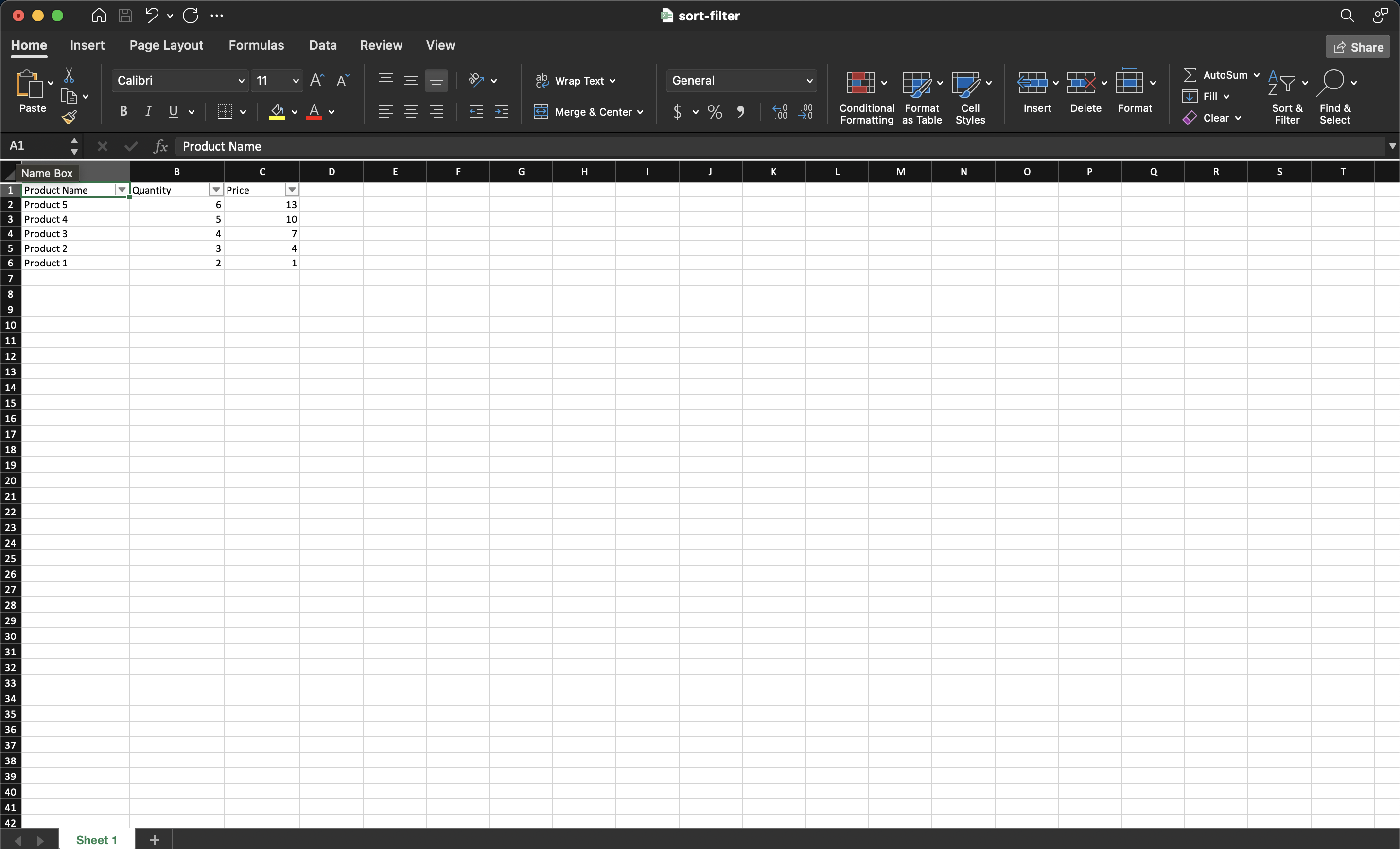
The example builds a three column product table, sets an autofilter over
A1:C6, then sorts by the price column in descending order starting at row 2.
The saved file opens with the rows already in price order and the filter
dropdowns live on the header.
git clone https://github.com/unidoc/unioffice-examples.git
cd unioffice-examples/spreadsheet/sort-filter
go run main.go
If this is your first time using UniOffice, follow the getting started guide to create an API key and set up your development environment.
View the full source
Sample output