Set Language Identifier
A screen reader picks its pronunciation rules from the document’s declared language. Get it wrong and English text read with a Dutch voice is close to unusable. The declaration has two levels: a default for the whole document on the catalog, and an override on any structure element whose content is in a different language.
Identifiers are RFC 3066 language tags, so en-US, en-GB, id-ID, de.
Doing it
c := creator.New()
c.SetLanguage("en-US")
That writes /Lang into the document catalog and applies to everything that does not
override it. One call, anywhere before writing.
Overriding on a structure element
A passage in another language gets its own Lang on the structure element that covers
it:
p := c.NewStyledParagraph()
p.SetText("Halo Dunia")
p.SetMarkedContentID(1)

k, err := p.GenerateKDict()
if err != nil {
    return err
}
k.Lang = core.MakeString("id-ID")
k.SetPageNumber(int64(c.Context().Page))

if err := c.Draw(p); err != nil {
    return err
}

docK.AddKChild(k)
SetMarkedContentID has to come before GenerateKDict, which copies the MCID into the
element it returns. And GenerateKDict builds a new element on every call, so calling
it twice on the same component gives you two dictionaries that both claim the same
marked content. Take the pointer once.
Lang inherits down the tree, so setting it on a Div or Sect covers everything
beneath it. Only set it on individual paragraphs when the language changes paragraph by
paragraph.
What PDF/UA requires
The two parts differ. The PDF/UA-1 verifier in model/pdfua does not require a catalog
Lang entry at all; PDF/UA-2 does, under clause 8.4.4-1. Both reject a Lang entry
that is present but empty.
If you are applying a profile rather than authoring by hand, Profile1Options and
Profile2Options each have a DefaultLanguage field. ApplyStandard writes it to the
catalog when the document declares no language, and ignores it when the field is empty
or a language is already set. It does not override what you set with SetLanguage.
Limitations
The identifier is not validated. SetLanguage("English") is written out verbatim, and
only a checker will tell you it is not a language tag.
There is no per-page language. Everything between the catalog default and a structure element’s override goes through the tree, so an untagged document has exactly one language.
SetLanguage("") writes nothing rather than clearing an existing entry, since the
creator only calls through to the catalog when the string is non-empty.
Run the example
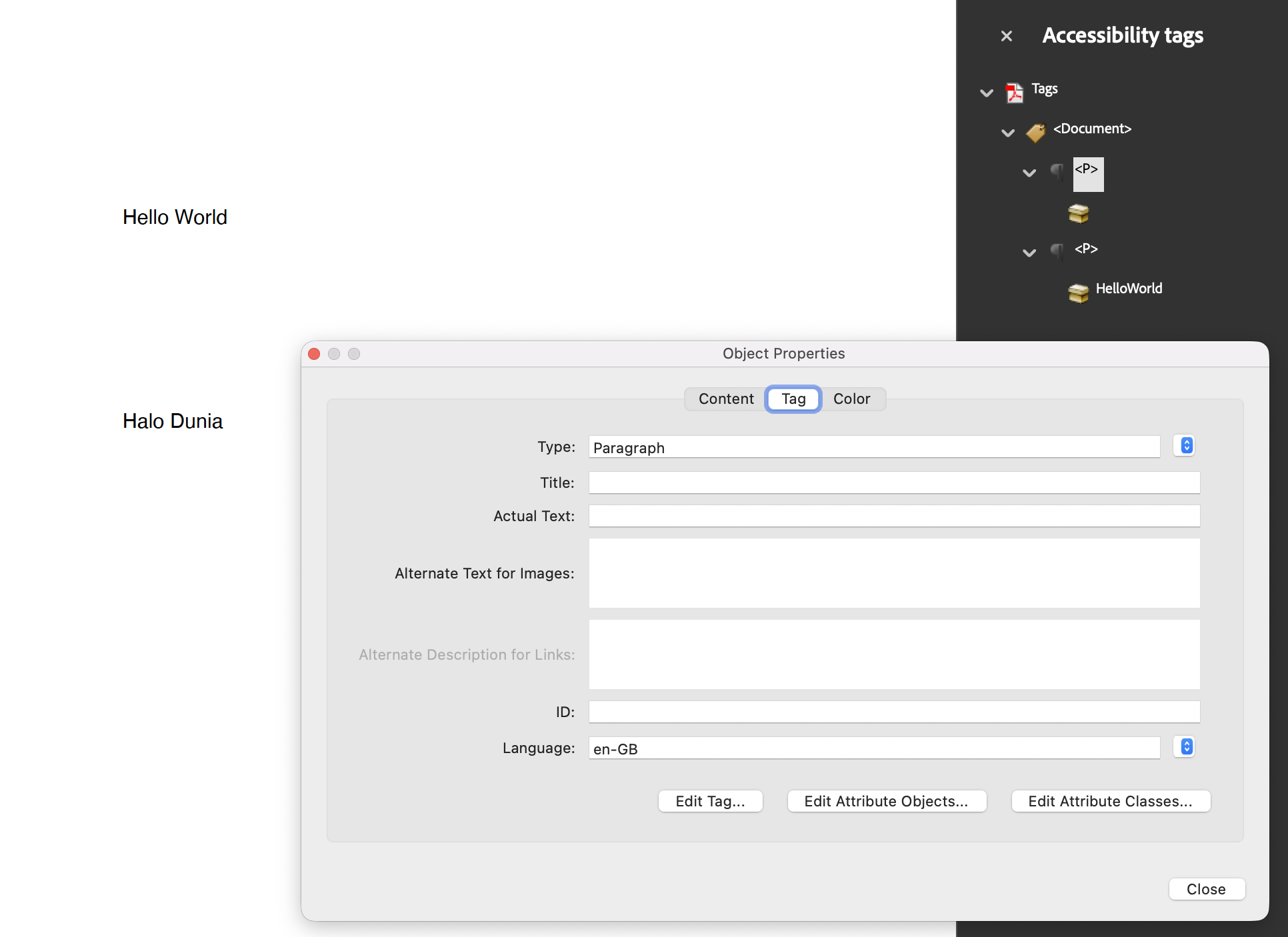
The example sets the document language to en-US and then draws two paragraphs, one
overridden to en-GB and one to id-ID, building the structure tree by hand. It also
sets /MarkInfo through SetPdfWriterAccessFunc, which is necessary because it does
not use TagComponents.
Read the second paragraph carefully before copying it: the example calls
p.GenerateKDict where it means sp.GenerateKDict, so the Indonesian element is
generated from the first paragraph and ends up with the wrong marked content
identifier.
git clone https://github.com/unidoc/unipdf-examples.git
cd unipdf-examples/accessibility
go run pdf_set_language_identifier.go
If this is your first time using UniPDF, follow the getting started guide to create an API key and set up your development environment.
View the full source
Sample output