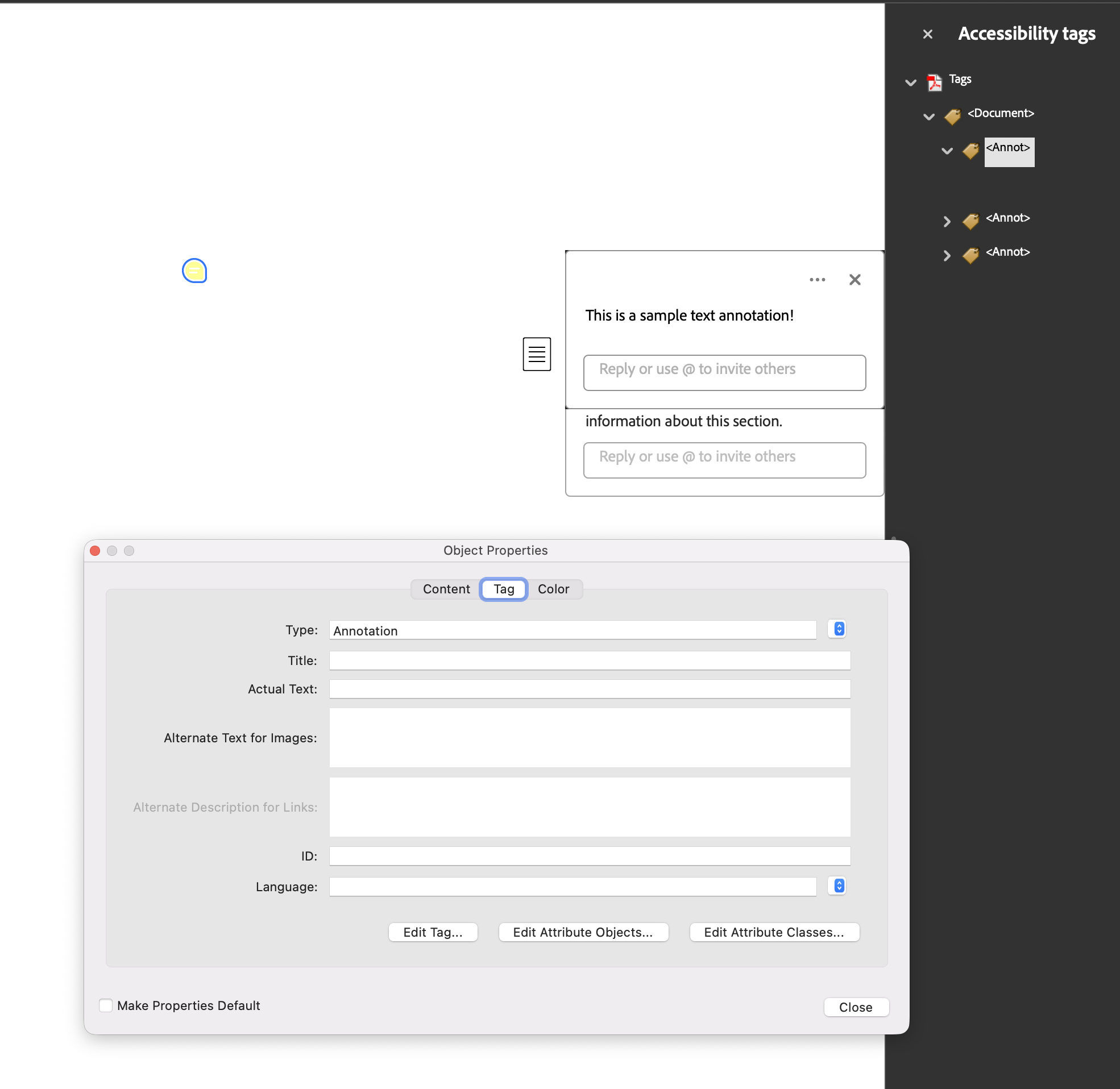
Tagging Annotations
An annotation lives on the page’s /Annots array, not in its content stream, so
nothing about it is reachable by walking marked content. PDF/UA requires every
annotation other than a Link or Popup to appear in the structure tree as an
Annot element, and to carry a /Contents string that describes it.
PdfAnnotation.GenerateKDict builds that element in one call. It works for any
annotation type, since it is defined on the embedded PdfAnnotation.
Doing it
annot := model.NewPdfAnnotationText()
annot.Contents = core.MakeString("Check this figure against the source data.")
annot.Rect = core.MakeArrayFromFloats([]float64{100, 600, 150, 650})
annot.Name = core.MakeName("Comment")

docK.AddKChild(annot.GenerateKDict())
page.AddAnnotation(annot.PdfAnnotation)
GenerateKDict returns an Annot element whose only child is a reference to the
annotation object. It returns nil for a nil receiver and never errors, unlike the
GenerateKDict on creator components.
/Contents is the description. There is no separate alternate text on the Annot
element, so an annotation with an empty Contents gives a screen reader nothing to
read no matter how the structure tree looks.
StructParent is handled for you
An annotation needs a /StructParent pointing back at its structure element, which is
the entry a viewer uses to go from annotation to tree. You do not set it.
StructTreeRoot.ToPdfObject walks the tree, finds every element whose structure type
is Annot or Link with an object reference child, allocates it a ParentTree number
and writes /StructParent into the annotation dictionary.
That is why the order of AddKChild and AddAnnotation does not matter: the wiring
happens at write time, from the tree, against the same annotation object.
The element references the annotation’s indirect object directly rather than wrapping
it in an OBJR dictionary. The parent tree code accepts both forms, and a strict
checker may flag the direct reference.
Mark the document
SetStructTreeRoot on its own does not set /MarkInfo in the catalog, which a tagged
PDF needs. The creator only writes it when TagComponents is enabled. Building the
tree by hand means adding it:
c.SetPdfWriterAccessFunc(func(w *model.PdfWriter) error {
    w.SetCatalogMarkInfo(core.MakeDictMap(map[string]core.PdfObject{
        "Marked": core.MakeBool(true),
    }))
    return nil
})
Pages with annotations need a tab order
The PDF/UA-1 verifier in model/pdfua checks clause 7.18 in two parts. Every
annotation that is presented to the reader needs a /Contents description, and every
page carrying one needs /Tabs set to structure order:
page.SetTabOrder(model.TabOrderStructure)Hidden annotations are exempt from both. The verifier treats an annotation as not
presented when its subtype is Popup, when its flags include Hidden or NoView, or
when its rectangle falls entirely outside the crop box. Those need no description and
do not force the /Tabs requirement.
/Tabs is one of the mechanical fixes ApplyStandard can make: applying a PDF/UA
profile sets it on every page that has annotations. /Contents it cannot invent.
Limitations
Links are not covered here. A Link element has to contain both the marked content of
the visible link text and the annotation reference, which is more than GenerateKDict
produces; see Tagging Links.
The Annot element has no /Pg, so it is not attached to a page in the tree. Reading
order for annotations therefore follows their position among the tree’s children,
which is the order you call AddKChild.
Run the example
The example builds a page with three text annotations of different subtypes, tags each
one, and writes the structure tree by hand.
createPdfWithTextAnnotations is the whole of it. Note that it constructs the page
with model.NewPdfPage and AddPage rather than drawing with the creator, so no page
content is tagged; only the annotations are. It also does not set /MarkInfo.
git clone https://github.com/unidoc/unipdf-examples.git
cd unipdf-examples/accessibility
go run pdf_tag_annots.go
If this is your first time using UniPDF, follow the getting started guide to create an API key and set up your development environment.
View the full source
Sample output