Tagging Grids
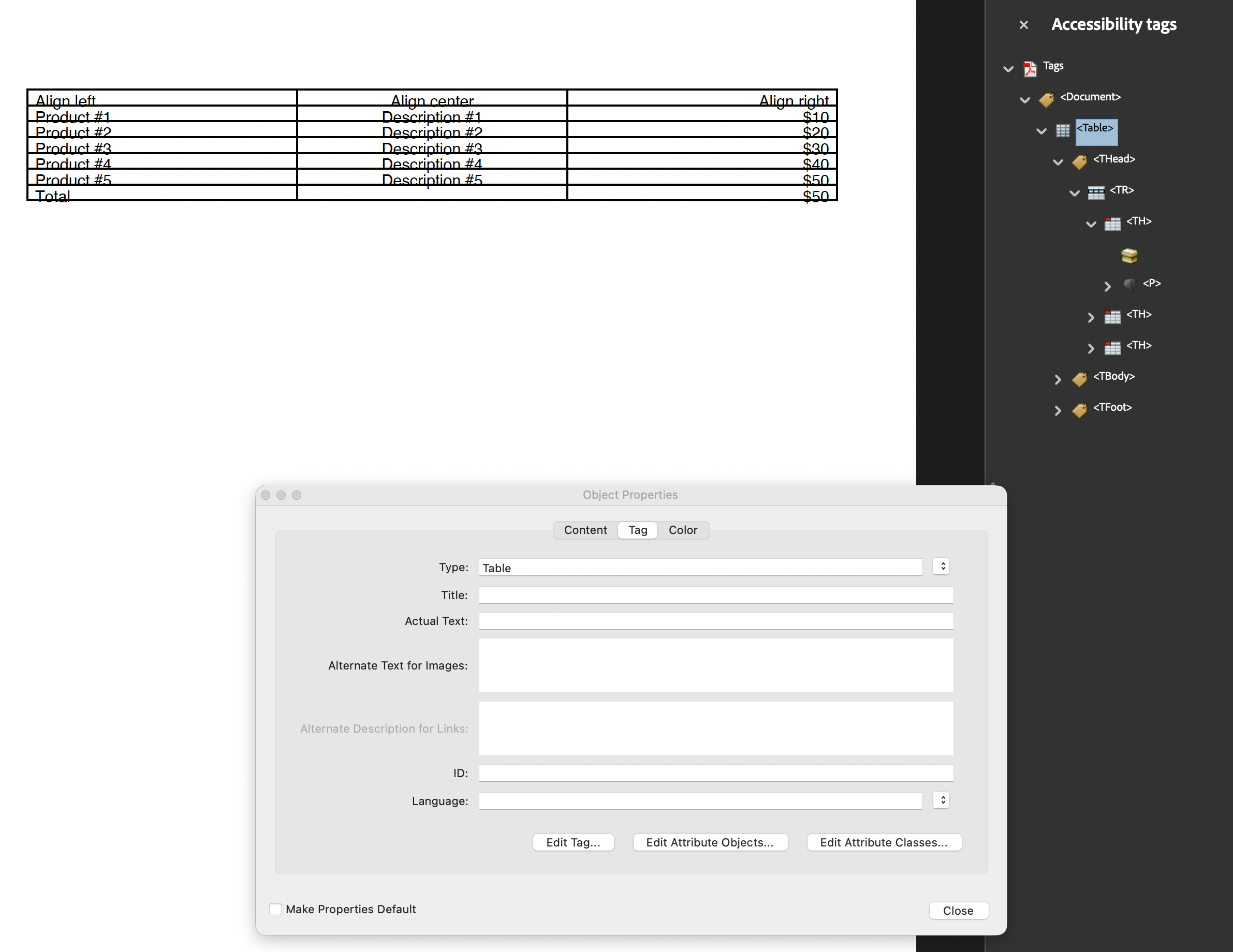
A tagged Grid produces a richer subtree than a tagged Table. Where Table puts
TR rows directly under the Table element, Grid groups them into THead, TBody
and TFoot section elements, driven by each row’s section. Cells come out as TH in a
header row and TD everywhere else.
Rows carry their own role, which is the structural difference between the two
components: Table declares a header once for the whole table over a range of rows,
Grid declares it per row.
| Row section | Section element | Cell type |
|---|---|---|
GridRowSectionBody (default) | TBody | TD |
GridRowSectionHeader | THead | TH |
GridRowSectionFooter | TFoot | TD |
GridRowSectionUnknown | none | TD |
Doing it
c := creator.New()
c.TagComponents(true)

grid := c.NewGrid(3)

header := grid.NewRow()
header.SetSection(creator.GridRowSectionHeader)
// ... add cells to header ...

body := grid.NewRow()
// ... add cells to body ...

if err := c.Draw(grid); err != nil {
    return err
}
With TagComponents(true) the creator calls the grid’s AddTag for you. Managing the
tree yourself means calling it with the parent element before Draw:
grid.AddTag(docK)A nil parent is a no-op logged at debug level, and the grid comes out untagged.
row.IsHeader() is shorthand for GetSection() == GridRowSectionHeader, useful when
you are building rows in a loop and want to check what a row was set to.
Section elements follow contiguous runs
A new section element is opened whenever a row’s section differs from the previous
row’s. Rows are not sorted or grouped first, so header, body, header produces two
separate THead elements rather than one. Group rows by section in the order you add
them.
GridRowSectionUnknown maps to the empty structure type, which means no section
element is emitted and the rows attach directly under whatever the current section
element was. It is not a useful value to set deliberately.
Header rows are not repeated across pages
SetSection(GridRowSectionHeader) sets the accessibility role only. It does not repeat
the row at the top of each page the way Table.SetHeaderRows does. That difference is
covered in Page Wrapping Grids, and it is the reason
to reach for Table when a long listing needs its column labels reprinted.
Limitations
Grid’s TH cells carry no scope attribute. Table writes /O /Table with
/Scope /Column onto its header cells; Grid writes only the structure type. Without
scope, assistive technology has to infer the header-to-data association from position,
and a strict PDF/UA-1 checker may flag it. If header association matters, Table is
the component that emits it.
Footer rows get TD cells, not TH. A totals row is data as far as the tree is
concerned, which is usually correct.
Setting a cell’s structure type by hand does not survive. The grid assigns each cell’s
type from the row’s section during layout, overwriting whatever you set, which is the
opposite of Table, where an explicitly set cell type wins.
Run the example
The example builds the structure tree by hand and draws a three column grid with one
header row, five body rows and a footer row, so all three section elements appear in
the output. drawGrid is the function to read; note that AddTag is called after the
rows are built but before Draw.
git clone https://github.com/unidoc/unipdf-examples.git
cd unipdf-examples/accessibility
go run pdf_tag_grid.go
If this is your first time using UniPDF, follow the getting started guide to create an API key and set up your development environment.
View the full source
Sample output