Tagging Links
A link annotation is not page content, so a screen reader cannot reach it by walking
marked content. It has to be attached to the structure tree explicitly: a Link
element that contains both the marked content of the visible link text and an object
reference to the annotation itself. PDF/UA-1 also wants every link annotation to have
a /Contents string, the tooltip, describing where it goes.
StyledParagraph has two calls that build all of that in one step.
| Call | Destination |
|---|---|
AddExternalLinkWithTag(text, url, opts) | A URL. |
AddInternalLinkWithTag(text, page, x, y, zoom, opts) | A position in this document. Pages are 1-based. |
Both return the *TextChunk for the link text and the *model.KDict for the Link
element. The second return value is the one you have to attach to the tree.
Doing it
p := c.NewStyledParagraph()
p.Append("Read the ")

_, linkK := p.AddExternalLinkWithTag("PDF specification", "https://example.com/spec", creator.LinkTagOptions{
    Tooltip: "https://example.com/spec",
    MCID:    1,
})

if err := c.Draw(p); err != nil {
    return err
}

docK.AddKChild(linkK)
LinkTagOptions has three fields. Tooltip becomes the annotation’s /Contents.
AltText becomes the Link element’s /Alt. MCID is the marked content
identifier, and it is also written to the annotation’s /StructParent so both refer
to the same parent tree entry.
Attaching the returned KDict is your job. Nothing in the creator does it, and a
Link element that is never added to a parent does not exist in the output.
MCID must be greater than zero
This is the trap. All the tagging in LinkTagOptions is gated on MCID > 0. Pass 0,
or leave the field at its zero value, and the call still adds a working, clickable
link, but it sets no structure type, associates no annotation, and returns a nil
KDict. There is no error and no log line.
That is the opposite of the usual convention, where MCIDs are per page and start at 0. Number tagged links from 1.
Alternate text is conditional
AltText is only applied when it is non-empty and different from the visible link
text. Setting AltText to the same string as the link text is a no-op, which is
deliberate: duplicating the visible text in /Alt makes a screen reader announce it
twice.
Reach for AltText when the visible text does not describe the destination. “Click
here” needs it; “Download the PDF specification” does not. The tooltip is separate and
should be set either way.
Limitations
Tagged links are only available on StyledParagraph. There is no equivalent on
Paragraph-style helpers or on a bare TextChunk created outside a paragraph.
Both calls swallow their error: on failure they log at error level and return two nil
values. A nil second return is the signal that something went wrong, or that MCID
was not set.
AddExternalLink and AddInternalLink, the untagged variants, produce no structure
element and pass an empty tooltip, so a document mixing them with the tagged variants
will have links that PDF/UA rejects.
A link split across a line break still gets one Link element covering the whole
chunk, which is the correct structure, but the annotation rectangle follows the
chunk’s layout.
Run the example
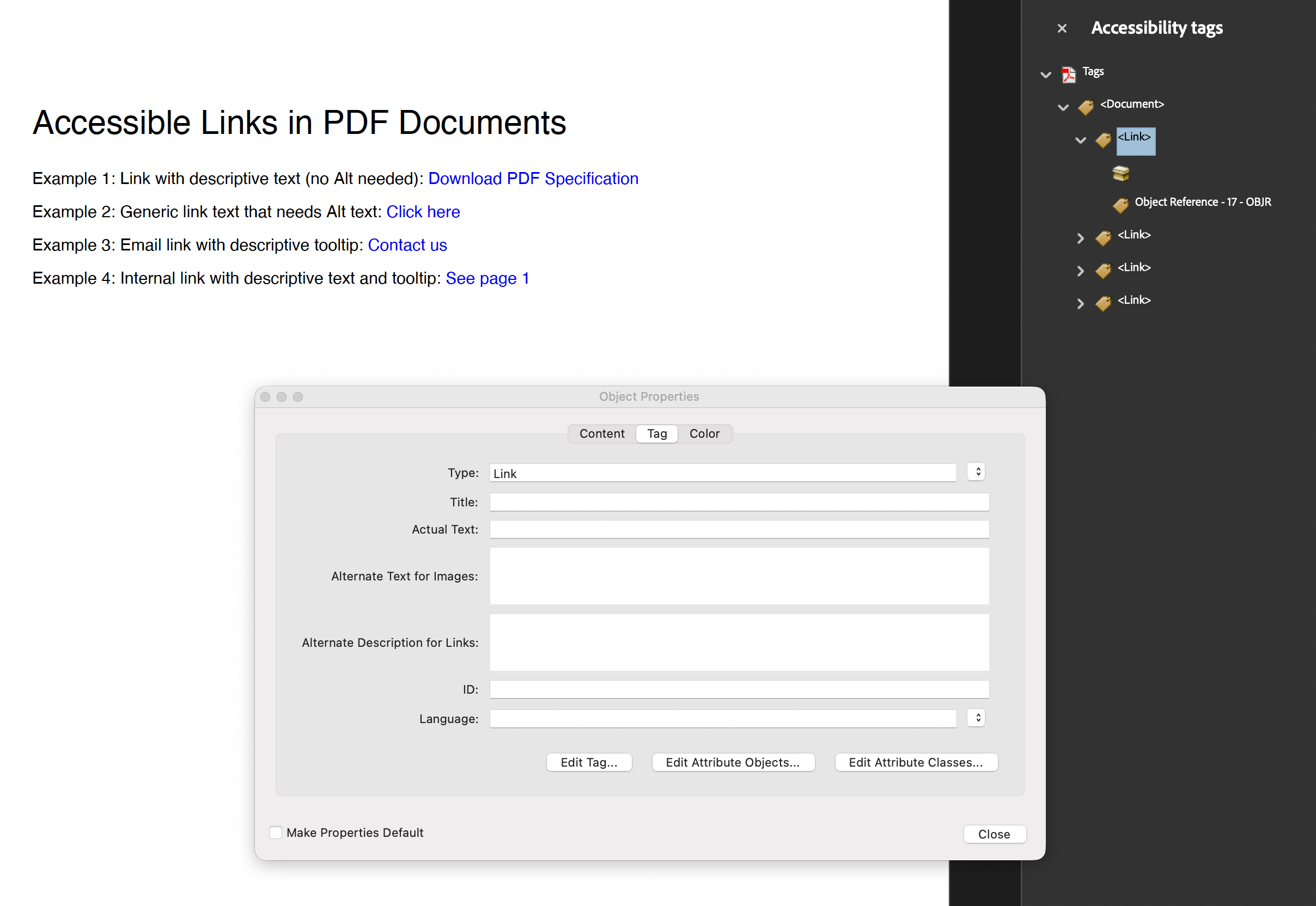
The example builds the structure tree by hand and shows four cases: a link whose text
is already descriptive, a “Click here” link that needs AltText, a mailto: link,
and an internal link. Each uses a distinct MCID, and each returned KDict is added to
the document element. Because the example does not use TagComponents, it also sets
/MarkInfo itself through SetPdfWriterAccessFunc.
git clone https://github.com/unidoc/unipdf-examples.git
cd unipdf-examples/accessibility
go run pdf_tag_link_annot.go
If this is your first time using UniPDF, follow the getting started guide to create an API key and set up your development environment.
View the full source
Sample output