Tagging Lists
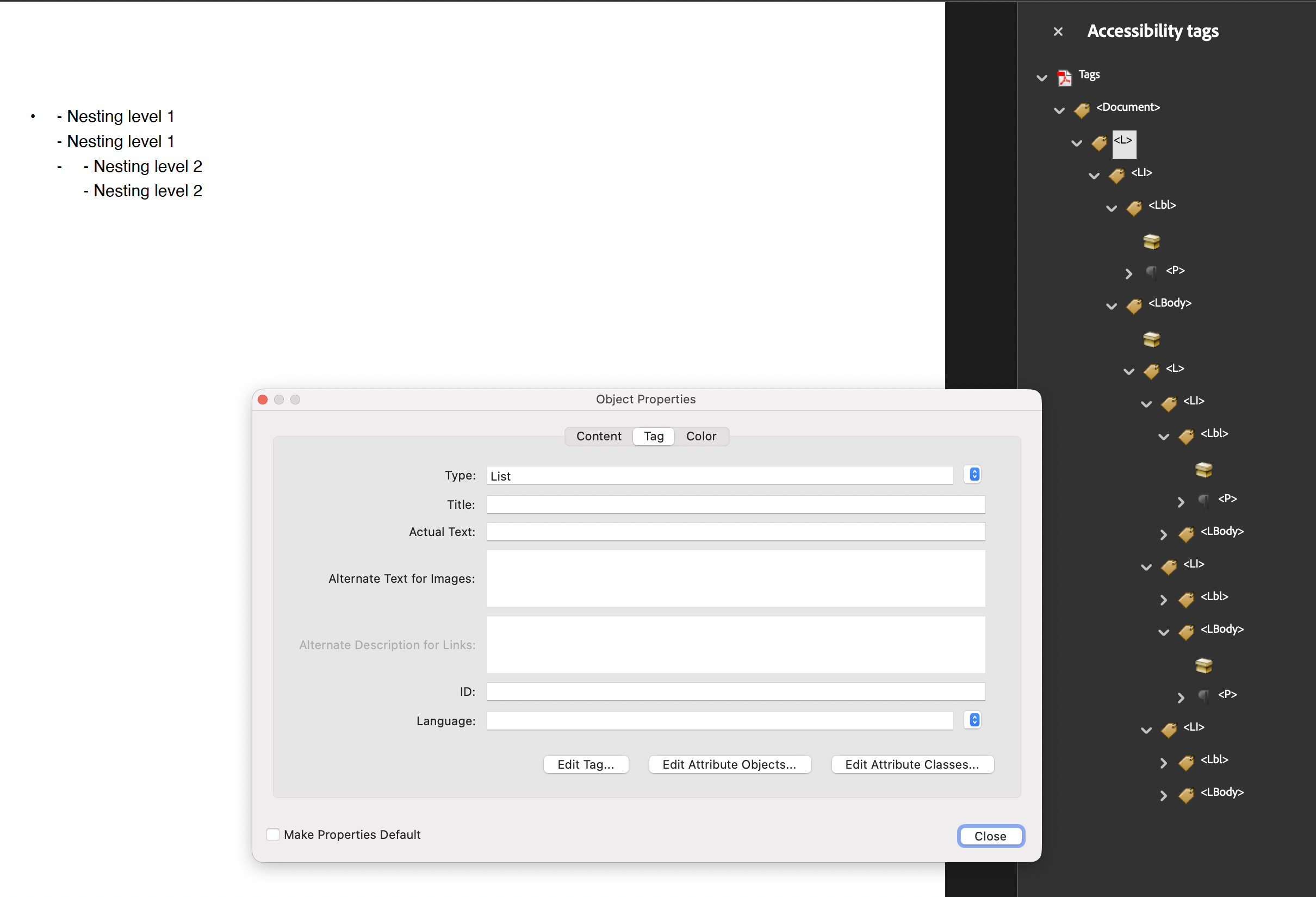
A tagged list is an L element holding one LI per item, and each LI splits into
an Lbl for the bullet or number and an LBody for the item text. That separation
is what lets a screen reader announce “list of five items” and skip the markers
rather than reading “hyphen” before every line.
List produces the whole subtree. All you have to do is tell it where to attach.
Doing it
c := creator.New()
c.TagComponents(true)

list := c.NewList()
list.AddTextItem("First item")
list.AddTextItem("Second item")

if err := c.Draw(list); err != nil {
    return err
}
With TagComponents(true) the creator calls AddTag for you. Managing the tree by
hand means calling it with the parent element:
list.AddTag(docK)Either way it has to happen before Draw, because the list only builds structure
when its tagging flag is set at layout time.
Nested lists attach themselves
A sublist added with parent.Add(sublist) lands in the parent item’s LBody cell,
and the parent wires the sublist’s L element into that LBody element on its own.
No second AddTag is needed:
sub := c.NewList()
sub.Marker().Text = "- "
sub.SetIndent(10)
sub.AddTextItem("Nested item")

list.Add(sub)
Calling sub.AddTag(someKDict) before adding it to the parent is not just redundant,
it is overwritten. The parent replaces the sublist’s parent element with the LBody
element it created, so whatever you passed is discarded.
That also means List.GenerateKDict is the wrong tool for building nesting by hand.
It returns a freshly constructed KDict that is not the element the list puts in the
tree, and it does not record the pointer anywhere. Anything attached to that returned
dictionary ends up in a subtree that never reaches the StructTreeRoot.
Limitations
List is implemented as a two column table internally, and its tagging follows from
that: rows become LI, the marker column becomes Lbl, the content column becomes
LBody. A consequence is that the list’s marked content numbering starts from the
MCID assigned to the list as a whole, and the internal table consumes one MCID per
row plus one per cell.
Lbl is emitted for every item, including items whose marker text is empty. There is
no way to produce an LI with only an LBody.
The list’s structure type is fixed to L when tagging is enabled. Setting a
different structure type on a List does not survive, since the internal table has
its type set to L during layout, which is also what triggers LI rows instead of
TR rows.
Run the example
The example builds the structure tree by hand and creates a top level list with two
further levels of sublists, each with its own marker and indent. Read main
top to bottom: the only call that is required is list.AddTag(docK) on the outermost
list. The GenerateKDict and per-sublist AddTag calls in the loop have no effect on
the resulting tree.
git clone https://github.com/unidoc/unipdf-examples.git
cd unipdf-examples/accessibility
go run pdf_tag_list.go
If this is your first time using UniPDF, follow the getting started guide to create an API key and set up your development environment.
View the full source
Sample output