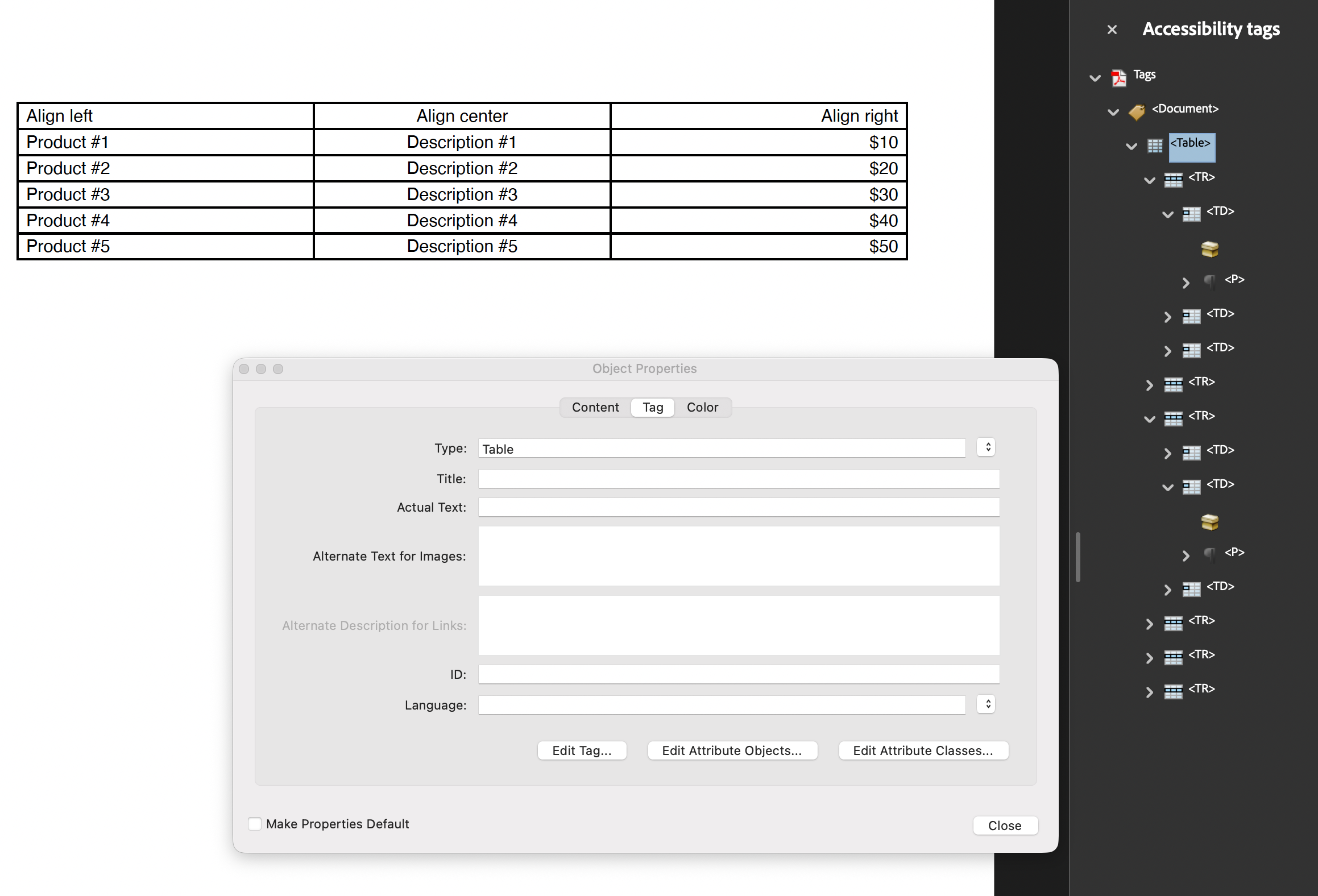
Tagging Tables
A table is the content type that suffers most from being untagged. Sighted readers
recover the grid from its layout; a screen reader reading an untagged table gets a
flat run of text with no idea which column heading a number sits under. Tagging a
Table produces a Table element containing TR rows, whose cells are TD data
cells or TH header cells, and the header cells carry the scope attribute that lets
assistive technology associate a value with its column label.
Table builds the whole subtree for you. You supply two things: where the table
attaches in the structure tree, and which rows are headers.
Doing it
c := creator.New()
c.TagComponents(true)

table := c.NewTable(3)
// ... add cells ...

if err := table.SetHeaderRows(1, 1); err != nil {
    return err
}

if err := c.Draw(table); err != nil {
    return err
}
With TagComponents(true) the creator calls the table’s AddTag itself and hangs
the Table element off the document root. Building the tree by hand instead means
calling AddTag yourself, with the KDict the table should sit under:
table.AddTag(docK)AddTag must run before Draw. It is what sets the table’s tagging flag and creates
the Table element; a table drawn before AddTag produces no marked content and no
structure. Passing a nil parent is a no-op that logs at debug level and leaves the
table untagged.
Rows and cells need no per-cell calls. As the table lays out, each row gets a TR
element and each cell a TD, wired to the cell’s marked content in the page.
Header cells and scope
SetHeaderRows(startRow, endRow) is doing double duty. It repeats those rows at the
top of every page the table spans, and it changes their cells’ structure type from
TD to TH. Each TH gets an attribute object of /O /Table with
/Scope /Column, which is the entry PDF/UA-1 relies on for header association.
Rows are 1-based and the range is inclusive, so a single header row is
SetHeaderRows(1, 1). A start or end row below 1, or a start after the end, returns
an error.
Without SetHeaderRows there are no header cells. A first row of column labels looks
like a header on the page and is tagged TD in the tree, which is the most common
defect in a tagged table produced with this API. Visual styling on that row changes
nothing.
Scope is always Column. There is no option to emit /Scope /Row, so a table whose
labels run down the left edge cannot express that relationship through
SetHeaderRows. Setting a cell’s structure type explicitly with
cell.SetStructureType(model.StructureTypeTableHeaderCell) does make it a TH, but
without the scope attribute: an explicitly set type takes precedence over the
header-row detection and skips the attribute step.
Limitations
A cell whose structure type has been changed from the default TD keeps whatever you
set, and the header-row logic does not override it. That is the escape hatch for
unusual roles, and also the reason a stray SetStructureType call can quietly undo
SetHeaderRows for that cell.
Cells with no content are skipped: no marked content, no TD element. An empty cell
in a tagged table leaves a gap in the row rather than an empty data cell.
The structure follows the rows as laid out, so a table spanning pages contributes its repeated header rows once per page.
Run the example
The example builds the structure tree by hand: a StructTreeRoot, a Document
element, and a three column table attached to it with AddTag. drawTable is the
function to read. It does not call SetHeaderRows, so its first row is tagged as
data cells rather than headers; add the call if you want a conforming header.
git clone https://github.com/unidoc/unipdf-examples.git
cd unipdf-examples/accessibility
go run pdf_tag_table.go
If this is your first time using UniPDF, follow the getting started guide to create an API key and set up your development environment.
View the full source
Sample output