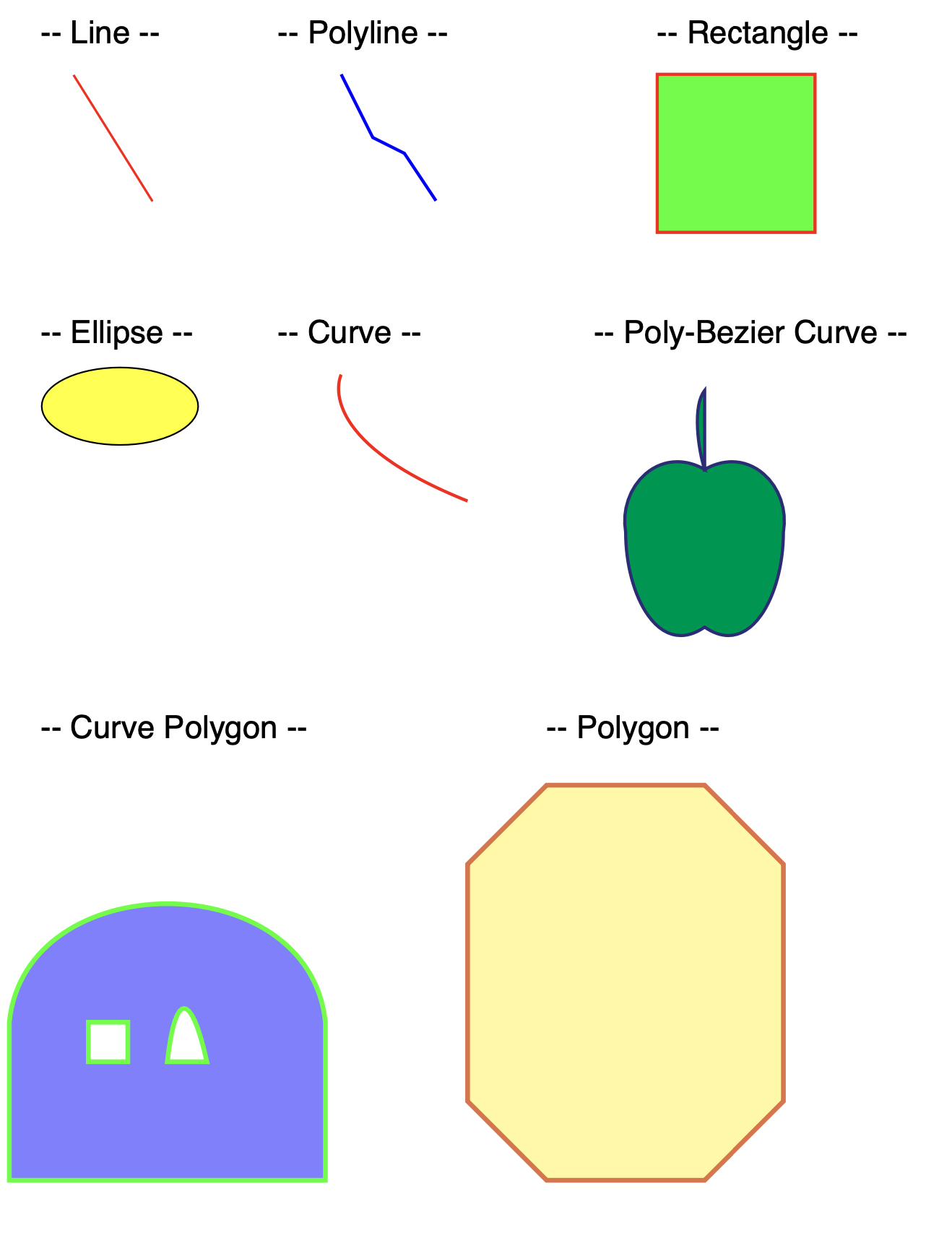
Draw Shapes
Beyond straight lines the creator has six shape components. Picking the right one is most of the work: they overlap in what they can render but differ sharply in how much layout support they have and in whether they can be filled.
Which component
| Component | Constructor | Fill | Notes |
|---|---|---|---|
Rectangle | NewRectangle(x, y, w, h) | yes | Upper left corner at (x, y). Supports rounded corners, relative positioning, margins, fit mode. |
Ellipse | NewEllipse(xc, yc, w, h) | yes | Center at (xc, yc), not a corner. Same layout support as Rectangle. |
Polyline | NewPolyline([]draw.Point) | no | An open run of straight segments. Stroke only. |
Polygon | NewPolygon([][]draw.Point) | yes | Rings of points. A second ring cuts a hole. |
Curve | NewCurve(x1, y1, cx, cy, x2, y2) | no | One segment with a single control point. Stroke only. |
PolyBezierCurve | NewPolyBezierCurve([]draw.CubicBezierCurve) | yes | Cubic segments joined into one path. |
CurvePolygon | NewCurvePolygon([][]draw.CubicBezierCurve) | yes | Rings of cubic curves. The curved counterpart of Polygon. |
Rectangle and Ellipse are the only two with any layout awareness, which is why
they’re also the only two you can meaningfully put in a table or grid cell. The rest
take page coordinates, draw where you tell them, and leave the layout context alone.
Doing it
rect := c.NewRectangle(420, 50, 100, 100)
rect.SetFillColor(creator.ColorGreen)
rect.SetBorderColor(creator.ColorRed)
rect.SetBorderWidth(2)

if err := c.Draw(rect); err != nil {
    return err
}
A new rectangle or ellipse starts with a 1 point black border and no fill, so it is
visible with no configuration at all. SetFillColor adds the fill;
SetBorderWidth(0) removes the border. SetBorderRadius(tl, tr, bl, br) rounds the
rectangle’s corners.
Both take separate SetFillOpacity and SetBorderOpacity values, so a translucent
fill under a solid outline needs no extra work.
Paths and holes
Polygon and CurvePolygon take a slice of rings rather than a flat list of points.
One ring is the common case:
polygon := c.NewPolygon([][]draw.Point{{
    {X: 300, Y: 550},
    {X: 350, Y: 500},
    {X: 450, Y: 500},
    {X: 500, Y: 550},
    {X: 300, Y: 550},
}})
polygon.SetFillColor(creator.ColorCMYKFrom8bit(0, 0, 100, 0))
polygon.SetBorderColor(creator.ColorBlack)
polygon.SetBorderWidth(3)
Extra rings are what make holes possible, but they aren’t automatic. Each ring is
closed and the whole path is filled with the nonzero winding rule, so an inner ring
only cuts a hole when its points run in the opposite direction to the outer ring.
Wound the same way it fills solid and you see nothing. The example’s CurvePolygon
puts a square window and an arch into an outline this way; its Polygon is a single
ring.
Unlike a rectangle, a polygon starts with neither a fill nor a border, so a polygon
with no colors set draws nothing at all and reports no error. A border also needs a
nonzero width: SetBorderColor on its own is not enough.
PolyBezierCurve and CurvePolygon both take draw.CubicBezierCurve values built
with draw.NewCubicBezierCurve(x0, y0, x1, y1, x2, y2, x3, y3), where the first and
last pairs are the endpoints and the middle two are control points. Joining segments
smoothly means repeating the previous endpoint as the next segment’s start point.
Curve is the odd one out with a single control point rather than two.
Limitations
Polygon and Polyline flip their stored points from top-left to PDF coordinates in
place. Drawing the same object a second time therefore flips it again, putting it in a
mirrored position on the page. Build a fresh component per draw rather than reusing
one. PolyBezierCurve, CurvePolygon, Rectangle and Ellipse do not have this
behavior.
Polyline and Curve have no fill setters at all. To fill a curved outline, use
PolyBezierCurve or CurvePolygon.
Only Rectangle, Ellipse and Line are accepted as cell content. Passing a
Polygon, Polyline, Curve or either Bezier component to a table or grid cell’s
SetContent returns core.ErrTypeError.
Nothing checks a shape against the page box, and none of the path components report an error for degenerate input. An empty point slice, a single-point polygon or a zero-size rectangle all draw nothing quietly.
Fill and border opacities below 1 add an ExtGState to the page resources. A fully
opaque shape adds none, so opacity is not free but is only paid for when used.
Run the example
The example draws one of each shape on a single letter page with a caption above it,
one function per shape. drawRectangle and drawEllipse are the simplest;
drawCurvePolygon is the one to read for rings and holes, and drawPolyBezierCurve
for joining Bezier segments into a closed outline.
git clone https://github.com/unidoc/unipdf-examples.git
cd unipdf-examples/drawing
go run pdf_draw_shapes.go
If this is your first time using UniPDF, follow the getting started guide to create an API key and set up your development environment.
View the full source
Sample output