Fill and Flatten With Appearance
A field value and the pixels a reader sees are separate things in a PDF. Setting
V does not draw anything; the widget annotation’s appearance stream does. When
a form is filled programmatically and then flattened, there is often no appearance
stream to bake in, and the output has blank boxes where the values should be.
annotator.FieldAppearance generates those streams.
It implements model.FieldAppearanceGenerator, so the same value is accepted by
form.FillWithAppearance and by reader.FlattenFields.
Where to apply it
| Call | Effect |
|---|---|
form.Fill(fdata) | Values set, no appearances generated. |
form.FillWithAppearance(fdata, fieldAppearance) | Values set and appearances generated. Form stays editable. |
reader.FlattenFields(allannots, fieldAppearance) | Appearances generated, then drawn into the page and the fields removed. |
Generating at flatten time is enough if the document is going to be flattened anyway. Generate at fill time when the output has to stay interactive and still render correctly everywhere, or when you want the appearance to reflect your style rather than what a viewer would produce.
Doing it
fieldAppearance := annotator.FieldAppearance{
    OnlyIfMissing:        true,
    RegenerateTextFields: true,
}

if err := pdfReader.AcroForm.Fill(fdata); err != nil {
    return err
}
if err := pdfReader.FlattenFields(true, fieldAppearance); err != nil {
    return err
}
OnlyIfMissing leaves existing appearance streams alone, which preserves whatever
a previous editor produced. RegenerateTextFields overrides that for text fields
only, and it is what you want after a fill: the appearance already in the file was
generated for the old value.
Styling
Style() returns the defaults when no style has been set:
AutoFontSizeFraction 0.65, BorderSize 0, black border, white fill,
MultilineLineHeight 1.2, MarginLeft 2.0, AllowMK true, and a ZapfDingbats
check mark rune. SetStyle replaces the whole struct rather than merging, so read
the defaults first and change what you need:
style := fieldAppearance.Style()
style.TextColor = model.NewPdfColorDeviceRGB(0.5, 0.8, 0.8)
style.BorderSize = 2.0
style.AllowMK = false
fieldAppearance.SetStyle(style)
AllowMK decides who wins when the widget has its own appearance characteristics.
Left true, the widget’s MK dictionary overrides your border color, fill color,
border width and even the check mark glyph. Set it false to force your style.
AutoFontSizeFraction is the fraction of the field height used as the font size
when the field’s DA specifies no size. Fonts takes an AppearanceFontStyle
with a Fallback font used when DA names no font or names one that is missing
from the form’s DR resources, plus FieldFallbacks for specific fields and
ForceReplace to override a valid DA font.
Limitations
Building a style literal from scratch is the main hazard. Because SetStyle does
not merge in defaults, an omitted CheckmarkRune stays zero, and generating the
appearance for a checkbox then fails with glyph not found, since rune zero has no
ZapfDingbats metrics. An omitted AutoFontSizeFraction means a computed font size
of zero. Starting from Style() avoids both.
TextColor must be an RGB color. generateTextColorContentStream type-asserts to
*model.PdfColorDeviceRGB and, on failure, returns no default appearance string
and no error, which leaves the field with no DA at all. A gray or CMYK color
therefore loses the field’s font and size settings silently. Use
model.NewPdfColorDeviceRGB.
Not every field type gets an appearance. Text fields, checkboxes, combo boxes and list boxes are generated. Radio buttons and push buttons are not: the button branch handles checkboxes and logs the rest as unhandled, so nothing is produced and a flattened radio group shows only whatever appearance was already in the file.
Two text field flags are deliberately skipped. A password field never gets an
appearance, because the value should not be stored in a stream, and a file select
field is unsupported. Both return without generating anything. A comb field gets
character-cell layout only when MaxLen is set; otherwise it falls back to
ordinary text layout.
The generator writes into the form as a side effect. It creates form.DR if the
form has none, adds fallback fonts to those resources, and rewrites ftxt.DA when
a text color is set. That is fine for a fill-then-write pipeline, but it does mean
the in-memory form is not left exactly as it was read.
Run the example
fillFieldsWithAppearance builds the FieldAppearance, calls Fill, then
flattens with the appearance generator. Input and output paths are hardcoded to
sample_form.pdf, sample_form.json and sample_form_output.pdf in the example
directory. Swapping Fill for the commented-out FillWithAppearance line
generates the appearances at fill time instead.
git clone https://github.com/unidoc/unipdf-examples.git
cd unipdf-examples/forms
go run pdf_fill_and_flatten_with_apearance.go
If this is your first time using UniPDF, follow the getting started guide to create an API key and set up your development environment.
View the full source
Sample output
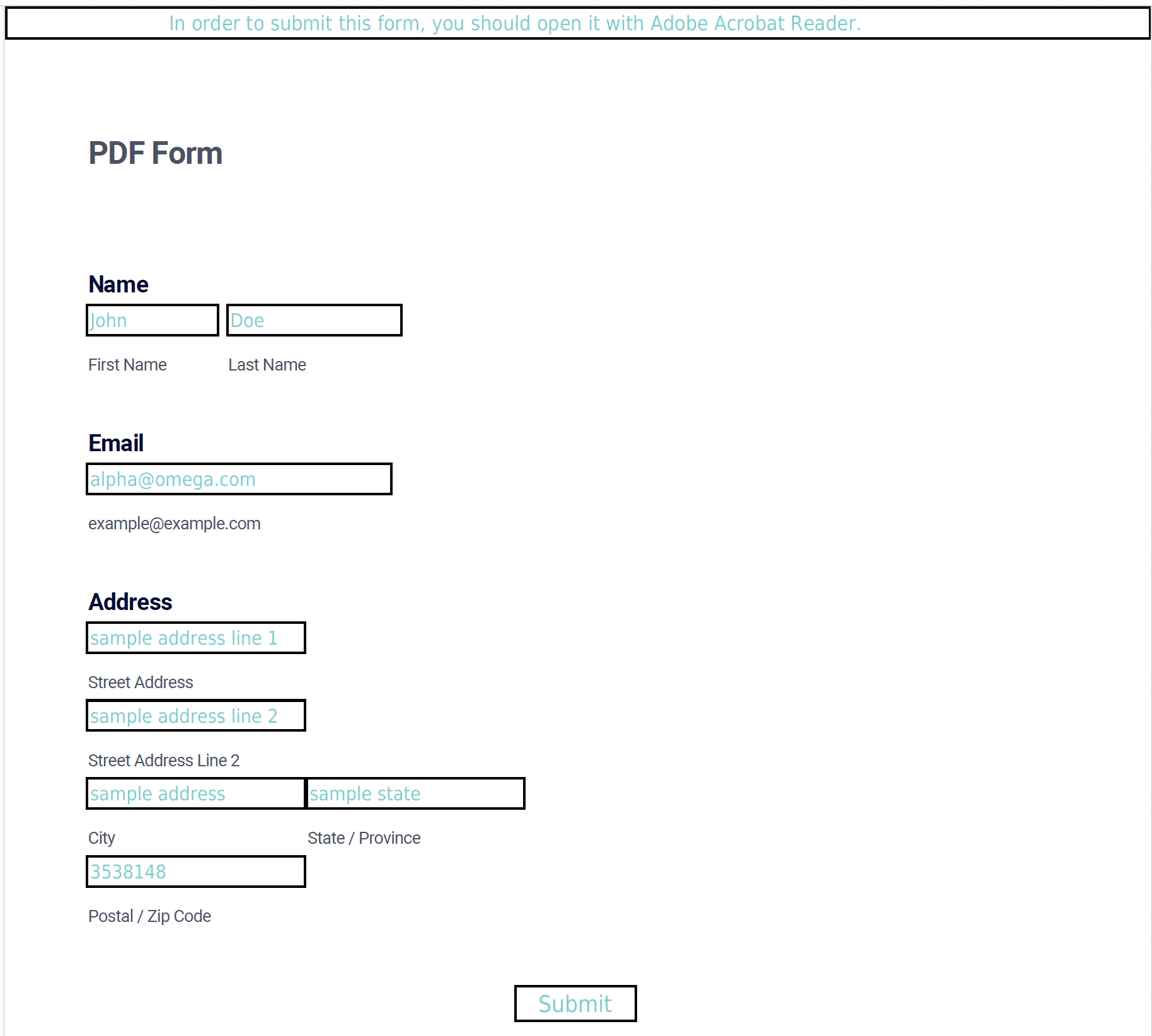
The values are drawn with the style’s text color, white fill and a two point border, and the fields are gone from the output document.