Get hOCR output
hOCR is HTML that carries the recognized words plus where each one sat on the page. Ask for it when plain text is not enough: drawing invisible text over a scan, picking out one field from a form, or dropping low-confidence words.
Nothing in UniPDF requests or parses hOCR specifically. You ask the service for it
with a form field, and ExtractText hands you the response body unchanged. See
OCR Service for how to start ocrserver and for the rest of OCROptions.
Doing it
client := ocr.NewHTTPOCRService(ocr.OCROptions{
    Url:     "http://localhost:8080/file",
    Headers: map[string]string{"Accept": "application/json"},
    FormFields: map[string]string{
        "format": "hocr",
    },
})

result, err := client.ExtractText(context.Background(), f, "image.jpg")
if err != nil {
    return err
}
FormFields entries become extra text fields in the same multipart form as the image.
The key is the service’s, not UniPDF’s: ocrserver reads format, and its /file
handler switches to Tesseract’s hOCR output when the value is hocr. Another service
will spell it differently, or take a query parameter instead.
ocrserver also accepts languages (comma-separated Tesseract language codes) and
whitelist (restrict recognition to a set of characters) through the same map.
Reading the geometry
The geometry lives in title attributes rather than in elements of its own:
<span class='ocr_line' id='line_1_4' title="bbox 62 153 443 172; baseline 0 -5; x_size 19; ...">
  <span class='ocrx_word' id='word_1_5' title='bbox 62 154 107 172; x_wconf 97'>Every</span>
bbox is x0 y0 x1 y1 in image pixels with the origin at the top left, which is
upside down relative to PDF user space. x_wconf is the word’s confidence from 0 to
100. x_size on a line is its text height, and baseline gives the slope and offset
of the baseline within the line box.
Pick any HTML or XML parser. The example uses github.com/stefanhengl/gohocr, which
is a third-party package and not part of UniPDF; it returns Page.Words, each with
Content and Title. Title is the unparsed attribute string, so splitting out
bbox and x_wconf is still your job.
Limitations
ocrserver returns hOCR inside the same JSON envelope it uses for plain text, a
result field alongside version, so the hOCR has to come out of the JSON before any
hOCR parser sees it. That is what the json.Unmarshal step in the example is for.
The example then calls strconv.Unquote on that string. This assumes the service
handed back an escaped string literal. json.Unmarshal has already unescaped
ocrserver’s value, and strconv.Unquote reports invalid syntax on anything that
doesn’t start with a quote character, so check what your service actually sends before
copying that line.
Tesseract’s hOCR is a fragment starting at the ocr_page div, not a full HTML
document. gohocr looks for words at body>div>div>p>span>span, so a fragment with
no body element, or a page whose word spans sit at a different depth, parses without
error and yields zero words. An empty word list is the symptom, not a parse failure.
Confidence is per word, and Tesseract reports 0 for marks it recognized but could not
identify, such as a bullet read as a degree sign. Filtering on x_wconf is usually
better than trusting every span.
Run the example
main posts one image with format: hocr, unwraps the JSON, parses the hOCR, then
prints each word with its raw title attribute.
git clone https://github.com/unidoc/unipdf-examples.git
cd unipdf-examples/ocr
go run hocr_sample.go input.jpg
If this is your first time using UniPDF, follow the getting started guide to create an API key and set up your development environment.
View the full source
Sample input
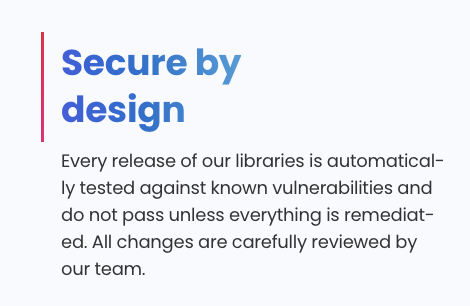
Sample output
The hOCR extracted from the JSON response, trimmed to the first two lines:
<div class='ocr_page' id='page_1' title='image ""; bbox 0 0 470 306; ppageno 0'>
 <div class='ocr_carea' id='block_1_1' title="bbox 62 48 443 275">
  <p class='ocr_par' id='par_1_1' lang='eng' title="bbox 63 48 241 85">
   <span class='ocr_line' id='line_1_1' title="bbox 63 48 241 85; baseline 0 -10; x_size 37; x_descenders 10; x_ascenders 7">
    <span class='ocrx_word' id='word_1_1' title='bbox 63 49 187 75; x_wconf 95'>Secure</span>
    <span class='ocrx_word' id='word_1_2' title='bbox 197 48 241 85; x_wconf 95'>by</span>
   </span>
  </p>
  <p class='ocr_par' id='par_1_2' lang='eng' title="bbox 62 93 443 275">
   <span class='ocr_line' id='line_1_4' title="bbox 62 153 443 172; baseline 0 -5; x_size 19; x_descenders 5; x_ascenders 4">
    <span class='ocrx_word' id='word_1_5' title='bbox 62 154 107 172; x_wconf 97'>Every</span>
    <span class='ocrx_word' id='word_1_6' title='bbox 113 154 175 167; x_wconf 96'>release</span>
    <span class='ocrx_word' id='word_1_11' title='bbox 328 153 443 167; x_wconf 91'>automatical-</span>
   </span>
  </p>
 </div>
</div>
Note automatical-. Words are reported as they appear in the image, hyphenated line
breaks included, because each span is tied to a box on the page.