Batch processing of images
BatchProcessFiles posts a list of images to the OCR service in parallel and returns
one result and one error per input. Reach for it when you have a folder of scans and
the per-request round trip is what’s slowing you down, rather than the service itself.
The service has to be running first. See OCR Service for how to start
ocrserver and for the full list of OCROptions fields.
Doing it
client := ocr.NewOCRHTTPClient(ocr.OCROptions{
    Url:     "http://localhost:8080/file",
    Headers: map[string]string{"Accept": "application/json"},
})

results, errs := client.BatchProcessFiles(context.Background(), filePaths)

for i, path := range filePaths {
    if errs[i] != nil {
        fmt.Printf("%s: %v\n", path, errs[i])
        continue
    }
    fmt.Printf("%s: %s\n", path, string(results[i]))
}
Both slices are the same length as the input and are indexed the same way, so
results[i] and errs[i] always belong to filePaths[i] no matter which request
finished first. Exactly one of the two is populated for each index.
Batching is only on *Client, the type NewOCRHTTPClient returns.
NewHTTPOCRService gives you the service directly and has no batch method.
BatchProcess is the same call over []*model.Image instead of paths.
Limitations
There is no aggregate error. A batch where every file failed still returns normally, so counting the non-nil entries in the error slice is the only way to know how it went. That is what the example’s summary block does.
Concurrency is fixed at ten in-flight requests, hardcoded in the package and not
exposed through OCROptions. UniPDF starts a goroutine per file immediately and the
internal semaphore holds the extras back. A thousand paths means a thousand
goroutines, most of them parked.
TimeoutSeconds applies per request, not to the batch. Ten concurrent recognitions is
enough to saturate a single Tesseract container, and requests that spend most of the
30 second default queued behind others fail with a deadline error rather than a partial
result. Either give the service more capacity, raise the timeout, or send the list in
chunks.
An empty slice returns (nil, nil) rather than empty slices. Both paths work if you
iterate over the input rather than over results.
The context is shared by every request in the batch. Canceling it abandons all of them, and the in-flight ones report the cancellation as their error.
Files that don’t exist are not treated specially. BatchProcessFiles calls
ExtractTextFromFile, so a missing path surfaces as error opening file ... in that
index of the error slice. The example checks with os.Stat up front instead, which
fails fast before any request goes out.
Run the example
main takes any number of image paths, validates that they all exist, runs the batch,
prints each result, then reports how many succeeded.
git clone https://github.com/unidoc/unipdf-examples.git
cd unipdf-examples/ocr
go run ocr_batch.go image1.png image2.png image3.png
If this is your first time using UniPDF, follow the getting started guide to create an API key and set up your development environment.
View the full source
Sample input
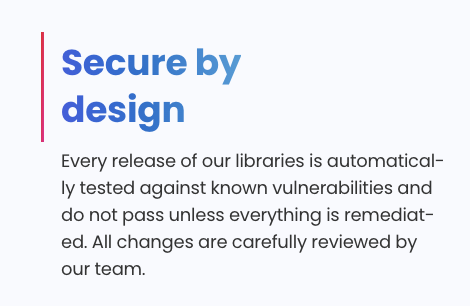
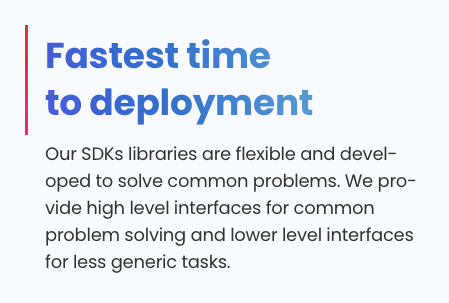

Sample output
Processing 3 files...

--- Results for sample.png ---
Extracted text from sample.png:
{
        "result": "Secure by\n\ndesign\nEvery release of our libraries is automatical-\nly tested against known vulnerabilities and\ndo not pass unless everything is remediat-\ned. All changes are carefully reviewed by\nour team.",
        "version": "0.2.0"
}

--- Results for sample2.png ---
Extracted text from sample2.png:
{
        "result": "Fastest time\nto deployment\nOur SDKs libraries are flexible and devel-\noped to solve common problems. We pro-\nvide high level interfaces for common\nproblem solving and lower level interfaces\nfor less generic tasks.",
        "version": "0.2.0"
}

--- Results for sample3.png ---
Extracted text from sample3.png:
{
        "result": "Pure Go PDF and\nOffice libraries\nUniPDF and UniOffice are all in Pure go\nmeaning you can build your applications\neasily, cross-compile across platforms and\nenjoy all the advantages of Golang.",
        "version": "0.2.0"
}

--- Summary ---
Successfully processed: 3 files
Failed to process: 0 files
Total files: 3
Results print in input order even though the requests ran concurrently.