Extract text from a single image
The smallest thing the ocr package does: take an image, post it to a service, hand
back what came out. Use it when you have a picture of text and want the text, and don’t
care where on the page each word sat.
The service has to be running first. See OCR Service for how to start
ocrserver, and for the full list of OCROptions fields.
Doing it
f, err := os.Open("input.jpg")
if err != nil {
    return err
}
defer f.Close()

client := ocr.NewHTTPOCRService(ocr.OCROptions{
    Url:     "http://localhost:8080/file",
    Headers: map[string]string{"Accept": "application/json"},
})

result, err := client.ExtractText(context.Background(), f, "image.jpg")
if err != nil {
    return err
}
fmt.Println(string(result))Method, FileFieldName and TimeoutSeconds are filled in by the constructor, so the
explicit POST / file / 30 in the example are documentation rather than necessity.
Url is the only field with no default.
The filename argument matters more than it looks. It becomes the filename in the
multipart form, and services generally pick their decoder from the extension. Pass an
empty string and UniPDF sniffs the first 512 bytes with http.DetectContentType, then
picks image.jpg, image.png or image.gif, falling back to image.jpg for anything
it cannot identify, a TIFF included.
Limitations
The return value is the raw response body. Nothing in UniPDF interprets it, so what you
print depends entirely on the service. With ocrserver and an Accept: application/json
header it is a JSON object holding result and version, which is why the sample output
below is JSON rather than bare text. Drop the header and you get that service’s default
instead.
A non-2xx response comes back as an error carrying the response body, so a service that
answers 400 for an image format it cannot decode surfaces as
request failed with status 400 Bad Request: ... rather than as empty text.
Retries are off by default. Setting MaxRetries retries non-2xx responses as well as
connection failures, and only the connection-failure path sleeps between attempts. A
service that consistently rejects an input is therefore retried MaxRetries + 1 times
in quick succession.
TimeoutSeconds covers the whole request. Large scans on a busy Tesseract can exceed the
30 second default, and the symptom is a deadline error, not a partial result.
Run the example
main opens the file named on the command line, builds the options, and prints the
response. A JPEG or PNG is the path of least resistance.
git clone https://github.com/unidoc/unipdf-examples.git
cd unipdf-examples/ocr
go run ocr_sample.go input.jpg
If this is your first time using UniPDF, follow the getting started guide to create an API key and set up your development environment.
View the full source
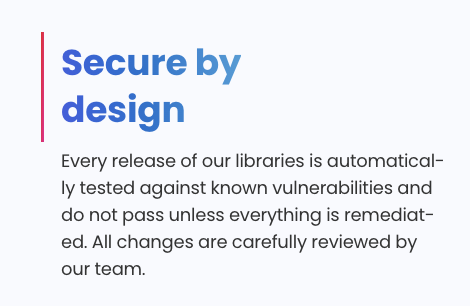
Sample input
Sample output
Extracted text: {
        "result": "Secure by\n\ndesign\nEvery release of our libraries is automatical-\nly tested against known vulnerabilities and\ndo not pass unless everything is remediat-\ned. All changes are carefully reviewed by\nour team.",
        "version": "0.2.0"
}
Note the hyphenated breaks. The service reports the layout it saw, so a word split across two lines in the image stays split in the output.