Row Span
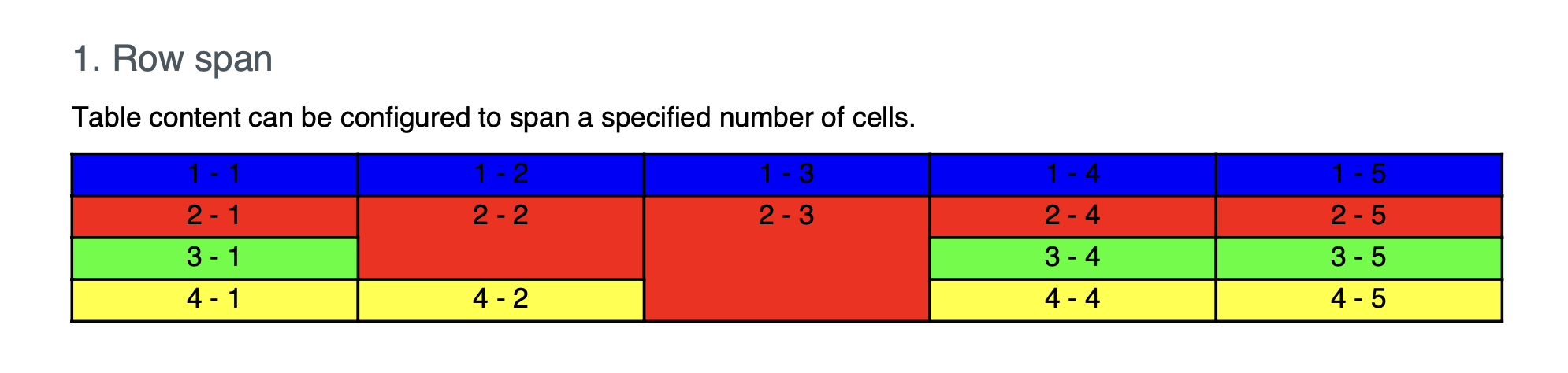
MultiRowCell creates a cell that covers several rows, the way a merged label
column works in a spreadsheet. The argument is the number of rows to occupy.
table := c.NewTable(5)

// A cell covering three rows of the first column.
cell := table.MultiRowCell(3)
cell.SetBorder(creator.CellBorderSideAll, creator.CellBorderStyleSingle, 1)
if err := cell.SetContent(p); err != nil {
    return err
}
Cells are added in sequence, and the table tracks which positions a spanning cell has already claimed. Once you add a cell spanning three rows in the first column, the cells you add next fill the remaining columns of those rows, then continue below the span. You do not skip positions manually.
Use MultiCell(rowspan, colspan) for a cell that spans both directions.
Interaction with row wrapping
A row-spanning cell taller than the rows it covers is laid out differently depending on whether the table has row wrapping on:
- With
EnableRowWrap(true), the overflow goes into the last row of the span, which is then free to split across a page boundary. - With wrapping off, which is the default, the overflow is spread evenly across all the spanned rows.
So turning row wrapping on changes how row spans look even on pages where nothing wraps. See the row wrap guide for the wrapping side of this.
Run the example
rowSpan creates a five column table and uses a local drawCell helper to add
cells with a given span, font and background color.
git clone https://github.com/unidoc/unipdf-examples.git
cd unipdf-examples/tables
go run pdf_tables_rowspan.go
If this is your first time using UniPDF, follow the getting started guide to create an API key and set up your development environment.
View the full source
Sample output