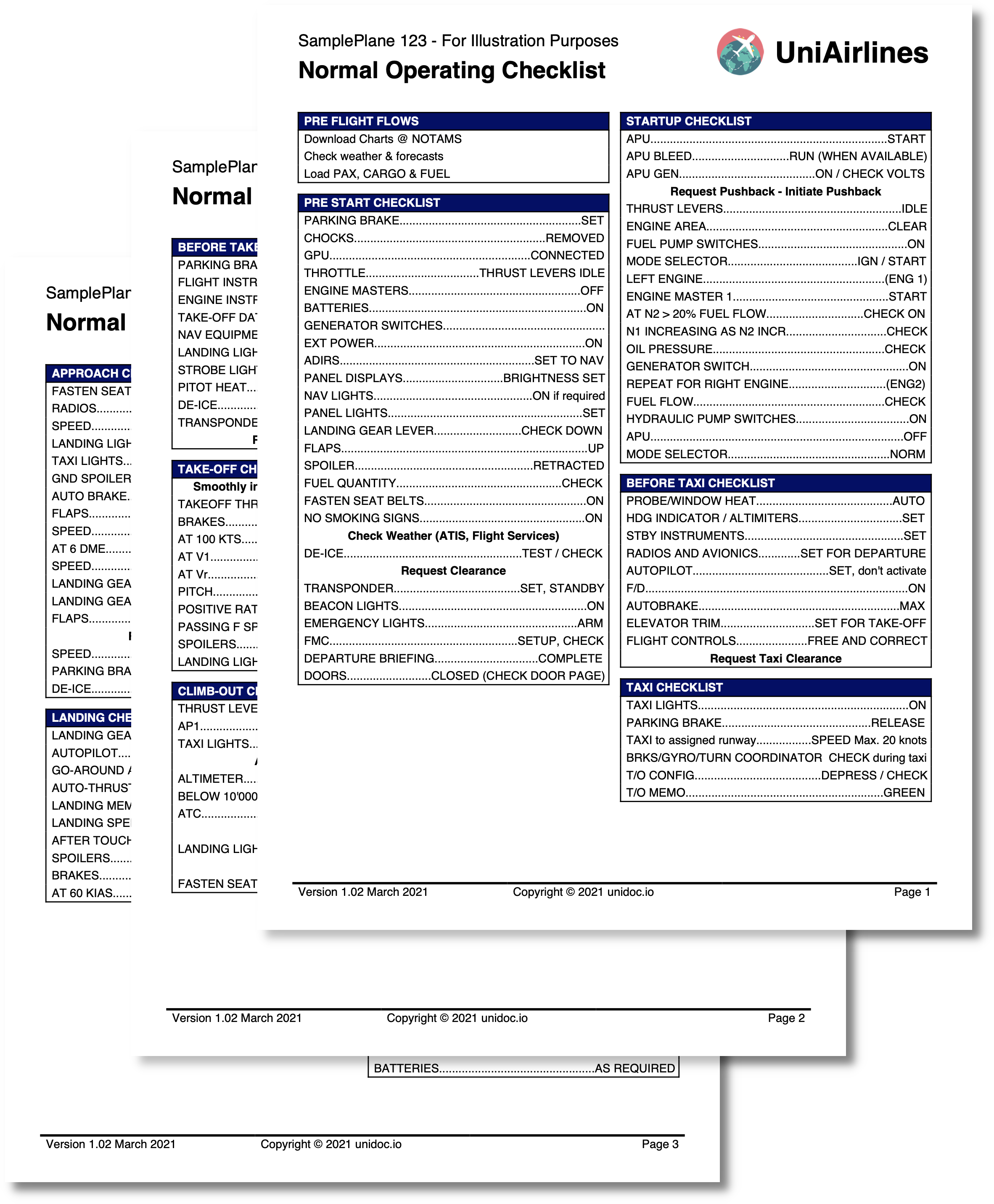
Aviation Checklist
A pre-flight checklist laid out in two columns, where no check group may be split across a column or page boundary. That is a layout problem the creator cannot solve on its own: it can move a group that does not fit, but the template has to decide which column the next group belongs in. This example solves it by measuring content in Go and having the template restructure itself. The templates overview covers the shared mechanics.
Measuring content from the template
Two helpers are exposed. The first builds throwaway styled paragraphs for a group’s title and items and sums their heights; the second compares a height against the space available:
tplOpts := &creator.TemplateOptions{
    HelperFuncMap: template.FuncMap{
        "calcTableHeight": func(check *Checks) float64 {
            titleSp := c.NewStyledParagraph()
            chunk := titleSp.SetText(check.Title)
            chunk.Style.Font = font

            height := titleSp.Height()
            for _, v := range check.Items {
                // build a paragraph per item and add its Height()
            }

            return height
        },
        "isFitInPageHeight": func(height float64) bool {
            return height <= c.Height()-320
        },
    },
}
StyledParagraph.Height() is the measurement that makes this work: a paragraph created
from the creator but never drawn still reports the height it would occupy, wrapping
included. It excludes margins, so a group’s real height is a little more than the sum
calcTableHeight returns. Note also that the helper sets the font on each chunk
explicitly - the measurement is only as good as the style used, and measuring in
Helvetica while rendering in bold gives the wrong answer.
c.Height() is the full page height, not the space left on it, so the 320 subtracted
from it is a hand-tuned allowance covering the margins and the fixed content around the
columns. A constant is workable here because that surrounding layout never changes;
nothing in the API reports the space remaining inside a partly-filled cell.
Restructuring the table mid-loop
Because a template is executed as text before any of it is parsed as XML, a branch can emit a closing tag whose opening tag came from somewhere else. The loop uses that to close the current cell and open a new one when a group would not fit:
{{if not (isFitInPageHeight $newHeight)}}
    {{/* Close current cell */}}
    </division>
    </table-cell>

    {{if eq $column 0}}
        {{$column = 1}}
    {{else}}
        {{/* Close current table and move to new table in new page */}}
        </table>
        <table columns="2">

        {{$column = 0}}
    {{end}}

    {{/* Start new cell */}}
    <table-cell>
    <division margin="{{$margin}}">
{{end}}

{{template "check-table" . }}
Filling the left column moves to the right column; filling the right one closes the table and starts a fresh two-column table, which the creator places on the next page because the first is full. Only the final text has to be well-formed XML - the tags do not have to balance within any single branch.
This is powerful and easy to get wrong. If one branch fails to emit a closing tag the
parse fails on the generated text, and the error position reported refers to that
generated text, not to a line in your .tpl file. Keep the emitted fragments adjacent
and commented, as here.
Keeping a group intact
Each group is its own table with page wrapping turned off:
<table enable-page-wrap="false" margin="0 0 10 0">enable-page-wrap="false" maps to Table.EnablePageWrap(false): instead of being split
at the boundary, a table that does not fit moves to the next page whole. That is what
keeps a group intact, and the height measurement above is only there to decide which
column to put it in. The one case it does not cover is a group taller than a full page,
where the creator re-enables wrapping automatically rather than loop forever.
The bottom border of the last item is found without an index comparison against a length:
{{template "check-entry" dict "WithBottomBorder" (eq $idx (len (slice $.Items 1))) "Item" $item}}len (slice $.Items 1) is the length of the list with the first element dropped, which
equals the last valid index. Handy in a template, where arithmetic is limited to the
add helper.
Dot leaders
The dotted run between a check label and its value is text, not a drawn line, computed
by the DisplayText method on CheckItem. It measures label plus value with
font.GetRuneMetrics, divides the leftover width by the width of a period, and repeats
that many dots. When fewer than six dots would fit it uses spaces instead, so a nearly
full line does not end in a stub of two or three dots.
GetRuneMetrics returns widths in 1000ths of an em, hence the metrics.Wx / 1000
scaling before multiplying by the font size. It also returns a second value reporting
whether the rune was found in the font, which is worth checking - a missing glyph
otherwise contributes zero width and the leader comes out too long.
Header and footer
The version, release date and page number appear on every page, drawn by one closure registered for both:
c.DrawHeader(func(block *creator.Block, args creator.HeaderFunctionArgs) {
    drawHeader("templates/header.tpl", block, checks.Version, checks.ReleaseDate, args.PageNum, args.TotalPages)
})
c.DrawFooter(func(block *creator.Block, args creator.FooterFunctionArgs) {
    drawHeader("templates/footer.tpl", block, checks.Version, checks.ReleaseDate, args.PageNum, args.TotalPages)
})
The 92 point top margin in c.SetPageMargins(30, 30, 92, 50) is what gives the header
room: the block passed to the callback is exactly as tall as the page’s top margin, and
anything taller is clipped. Both templates are drawn with the same tplOpts as the
body, so the helper functions remain available to them.
Run the example
The output is a multi-page checklist. calcTableHeight and isFitInPageHeight in the
Go file, and the {{if not (isFitInPageHeight ...)}} block in templates/main.tpl, are
the two halves of the layout logic.
git clone https://github.com/unidoc/unipdf-examples.git
cd unipdf-examples/templates/aviation-checklist
go run pdf_aviation_checklist.go
If this is your first time using UniPDF, follow the getting started guide to create an API key and set up your development environment.
View the full source
Sample output