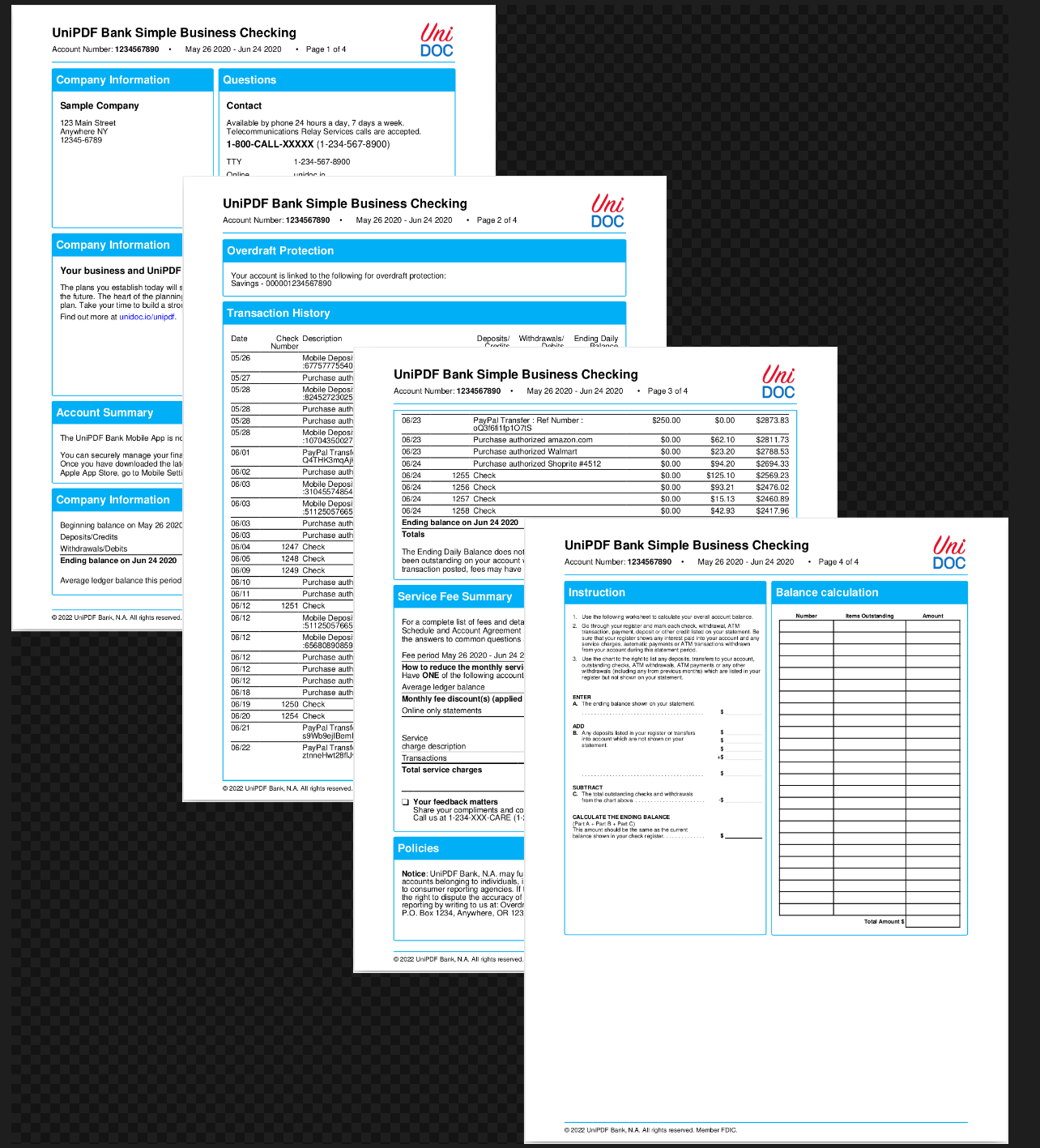
Bank Account Statement
A business account statement: contact panels, an account summary, a transaction list that runs onto a second page, and a blank reconciliation worksheet. It is the longest single template in the set, and the way it is organized differs from the other examples in a way worth understanding before you write one of your own. The templates overview covers the shared mechanics.
Subtemplates with defaults
Most of these examples hand a subtemplate a dictionary containing every attribute it reads. This one puts the defaults inside the subtemplate instead:
{{define "simple-paragraph"}}
    {{$font := "helvetica"}}
    {{if .Font}} {{$font = .Font}} {{end}}

    {{$fontSize := 10}}
    {{if .FontSize}} {{$fontSize = .FontSize}} {{end}}

    {{$text := ""}}
    {{if .Text}} {{$text = .Text}} {{end}}

    <paragraph margin="{{$margin}}" line-height="{{$lineHeight}}" text-align="{{$align}}">
        <text-chunk font="{{$font}}" font-size="{{$fontSize}}" color="{{$textColor}}">{{$text}}</text-chunk>
    </paragraph>
{{end}}
Callers then pass only what differs, and a plain dict works as well as extendDict:
{{template "table-cell-paragraph" (dict "Text" "Deposits/Credits")}}
{{template "table-cell-paragraph" (dict "Align" "right" "Text" (printf " %.2f" .Deposits))}}
The advantage is robustness. A key left out of the dictionary is invisible here, whereas
in the property-map style it renders as the literal string <no value> inside an
attribute. In a template with this many call sites that matters. The trade-off is that
{{if .X}} is false for zero and for the empty string as well as for a missing key, so
you cannot pass "FontSize" 0 or "Text" "" and have it override the default. That is
rarely a problem for a font size and occasionally is for a border width.
The two styles do not mix well, since a caller that supplies everything gains nothing from the guards and pays for them in template size. Pick one per document.
Helpers that generate form furniture
Statement paperwork is full of dotted fill-in rules and blank grids, and neither is worth writing out. Three helpers cover them:
HelperFuncMap: template.FuncMap{
    "strRepeat": strings.Repeat,
    "loop": func(size uint64) []struct{} {
        return make([]struct{}, size)
    },
    "formatTime": func(val, format string) string {
        t, _ := time.Parse("2006-01-02T15:04:05", val)
        return t.Format(format)
    },
},
strings.Repeat is registered directly - a helper does not have to be a closure, only a
function with a usable signature:
{{template "table-cell-paragraph" (extendDict $props "Colspan" 2 "Text" (strRepeat ". " 40))}}loop exists because range needs something to iterate. A slice of 25 empty structs is
the cheapest way to say “emit this row 25 times”, and the index is available where it is
needed:
{{range $i, $unused := (loop 4)}}
    {{$text := "$ "}}
    {{if eq $i 3}}
        {{$text = "+$ "}}
    {{end}}
    ...
{{end}}
The built-in makeSeq start step end helper does the same job when you want actual
numbers rather than a count.
Checkbox glyphs without a font file
The empty checkboxes come from Zapf Dingbats, one of the standard 14 fonts, so they need
no FontMap entry and no TTF file shipped with the example. The template names the font
and passes the glyph as text - written as a literal character in the file, or equally as
an XML character reference:
{{template "simple-paragraph" dict "Margin" "-4 0 0 0" "Font" "zapf-dingbats" "FontSize" 12 "Text" "❑"}}Any of courier, helvetica, times, symbol and zapf-dingbats and their bold and
oblique variants can be named directly in a font attribute. Only fonts outside that
set need loading into FontMap, as the log book example does.
Header and footer
One closure serves both, differing only in the template path it is given:
drawHeader := func(tplPath string, block *creator.Block, pageNum, totalPages int) {
    tpl, err := readTemplate(tplPath)
    if err != nil {
        log.Fatal(err)
    }

    data := map[string]interface{}{
        "Date":       time.Now(),
        "Statement":  statement,
        "PageNum":    pageNum,
        "TotalPages": totalPages,
    }

    if err := block.DrawTemplate(c, tpl, data, tplOpts); err != nil {
        log.Fatal(err)
    }
}
The header prints Page {{.PageNum}} of {{.TotalPages}} and the statement period, and
the footer a copyright line built from {{.Date.Year}}. Passing a time.Time straight
into the data is enough for that; methods and fields on a data value are reachable from
the template.
The header calls formatTime for the statement period, which is why it is drawn with the
same tplOpts as the body rather than nil. Helper names are resolved when the template
is parsed, so a template calling an unregistered function does not silently print
nothing - DrawTemplate returns a “function not defined” parse error.
The 80 point top margin in c.SetPageMargins(50, 50, 80, 25) is what gives the header
its room, since the block handed to the callback is exactly as tall as that margin.
Run the example
The statement runs to several pages, and the transaction table continues across the
boundary without any configuration. Read templates/main.tpl from the top: the three
define blocks account for most of the layout, and the panels below them are all calls
into those.
git clone https://github.com/unidoc/unipdf-examples.git
cd unipdf-examples/templates/bank-account-statement
go run pdf_bank_account_statement.go
If this is your first time using UniPDF, follow the getting started guide to create an API key and set up your development environment.
View the full source
Sample output