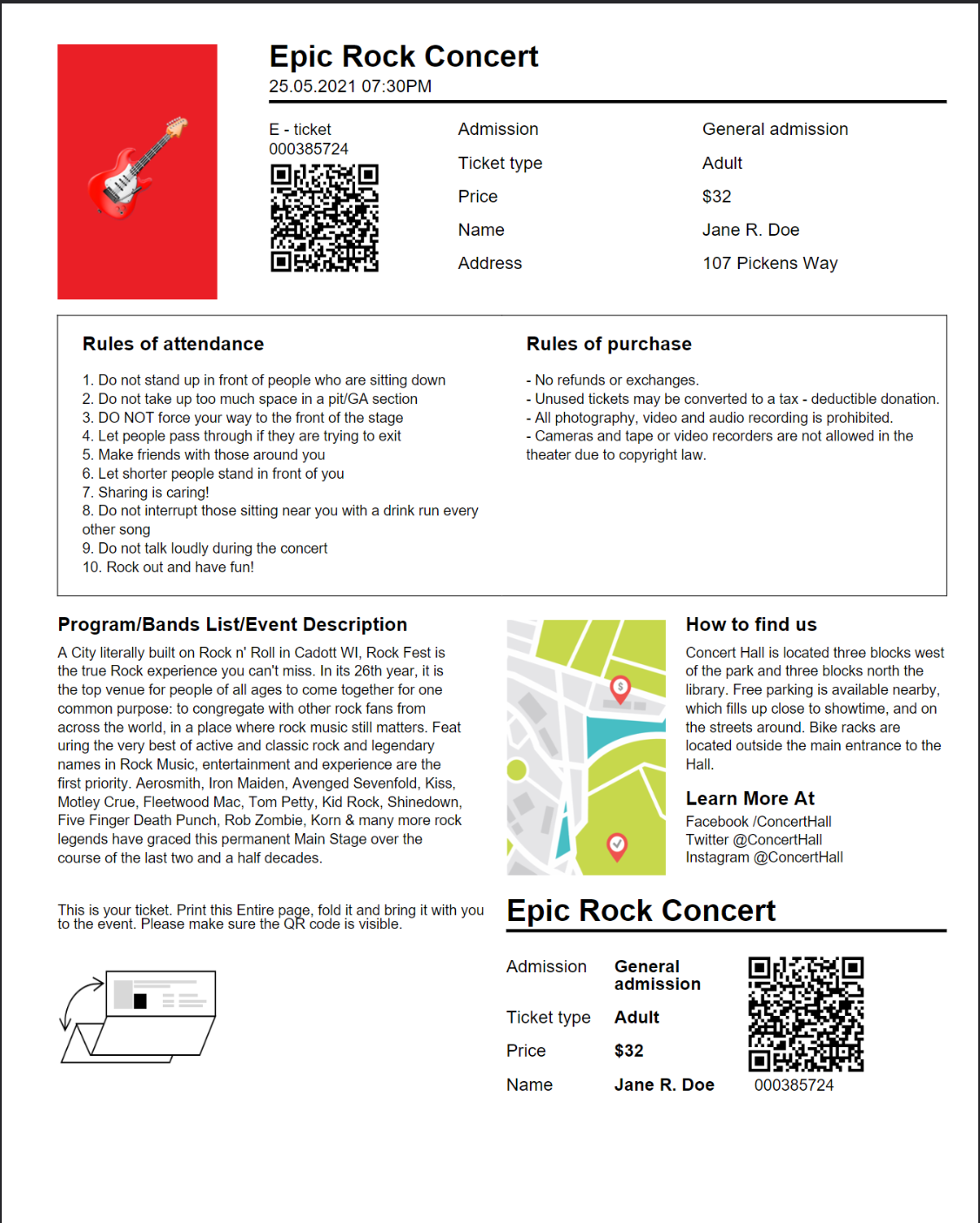
Concert Ticket
A concert ticket with a detachable stub: the main ticket carries the event heading, detail fields, a venue map and a QR code, and the stub repeats a shorter version of the same information. Where the boarding pass reuses one large block verbatim, this template reuses two small ones with different arguments each time. The templates overview covers the shared mechanics.
Varying a subtemplate by argument
{{template}} passes exactly one value, so arguments are bundled into a map with
dict. The header block reads three keys, one of which the stub omits:
{{define "header"}}
    <division padding="0 0 0 5">
        <paragraph>
            <text-chunk font="helvetica-bold" font-size="{{.FontSize}}">Epic Rock Concert </text-chunk>
        </paragraph>
        {{if .Time}}
        <paragraph margin="5 5 0 0">
            <text-chunk font-size="{{.SubFontSize}}" >{{.Time}} </text-chunk>
        </paragraph>
        {{end}}
        <line fit-mode="fill-width" position="relative" thickness="2.0" margin="5 0 0 0"></line>
    </division>
{{end}}
The main ticket supplies a formatted time and the stub does not:
{{template "header" dict "FontSize" 19 "SubFontSize" 11 "Time" (formatTime .EventTime "02.01.2006 03:04PM")}}
...
{{template "header" dict "FontSize" 19 "SubFontSize" 12}}
{{if .Time}} is what makes the omission safe. Reading a key that a dict does not
contain yields the empty value, so the guard is false and the paragraph is skipped
entirely. Without the guard, the same call would emit <text-chunk> containing the
literal string <no value>. Treat {{if}} around an optional key as required, not
defensive.
The detail rows go through the same pattern. ticket-detail renders one cell, so a
label/value pair is two calls, and the stub changes the value’s font while keeping the
label’s:
{{range .Detail}}
    {{if ne .FieldName "Address"}}
        {{template "ticket-detail" dict "FontName" "helvetica" "FontSize" 11 "Name" .FieldName }}
        {{template "ticket-detail" dict "FontName" "helvetica-bold" "FontSize" 11 "Name" .FieldValue}}
    {{end}}
{{end}}
The ne test drops the venue address from the stub, which has no room for it. Filtering
in the template rather than in Go means the JSON stays a single list of fields and both
copies read from it.
Resources
The QR code is the only registered resource, plus a formatTime helper for the event
timestamp:
tplOpts := &creator.TemplateOptions{
    ImageMap: map[string]*model.Image{
        "qr-code": qrCode,
    },
    HelperFuncMap: template.FuncMap{
        "formatTime": func(val, format string) string {
            t, _ := time.Parse("2006-01-02T15:04:05Z", val)
            return t.Format(format)
        },
    },
}
The same image name is drawn twice, once at 70 points and once at 75, which is the case
ImageMap is for - the QR raster is decoded once and referenced by name from both
places. The guitar photo, venue map and ticket illustration are one-off assets loaded
inline with path().
Note that the layout constrains images with explicit width and height rather than
fit-mode, since the photo columns are fixed-width and the images have to match them
regardless of the cell contents.
Run the example
main builds the QR code, reads concert-ticket.json and templates/main.tpl, and
makes one DrawTemplate call. The header and ticket-detail definitions at the top
of the template are where the reuse happens.
git clone https://github.com/unidoc/unipdf-examples.git
cd unipdf-examples/templates/concert-ticket
go run pdf_concert_ticket.go
If this is your first time using UniPDF, follow the getting started guide to create an API key and set up your development environment.
View the full source
Sample output