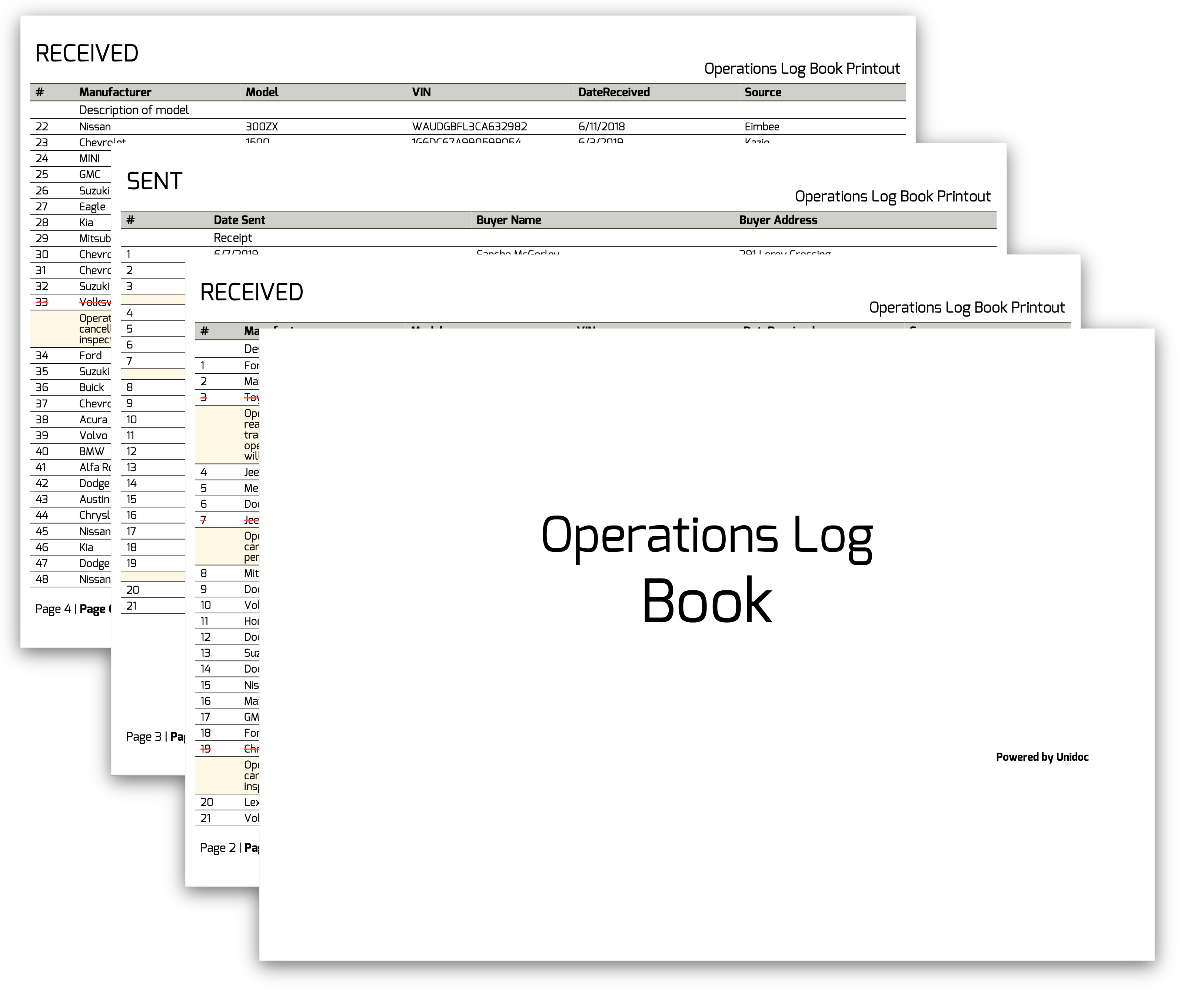
Log Book Report
An operations log book: a thousand records, each appearing twice - once in a “received” table and once in a facing “sent” table - on landscape pages behind a cover sheet. The interesting part is that the pagination is decided in Go rather than left to the creator, because the two views of a record have to line up on facing pages. The templates overview covers the shared mechanics.
Deciding page contents in Go
splitData slices the record list into fixed-size windows and returns them keyed by the
page they belong to:
func splitData(items []Item) map[int][]Item {
    start, end, page, size := 0, 0, 2, 0
    pageContent := map[int][]Item{}
    for end < len(items) {
        if page == 2 {
            size = 21
        } else if page == 4 {
            size = 27
        } else {
            size = 28
        }
        end = end + size
        current := items[start:end]
        start = end
        pageContent[page] = current
        page += 2
    }

    return pageContent
}
The row counts are measured by hand against the font and page size, and the first two windows are smaller than the steady-state 28. Page numbers step by two because each window produces two pages, received then sent.
Turning it over to range in the template gives the pages in order:
{{$pageContent := .PageToItems}}
{{range $key, $items := $pageContent}}
    {{template "received-page" dict "Items" $items "StartingNum" $currentPos}}
        <page-break></page-break>
    {{template "sent-page" dict "Items" $items "StartingNum" $currentPos}}
        <page-break></page-break>
    {{$currentPos = add $currentPos (len $items)}}
{{end}}
Ranging over a map is safe here because Go’s text/template visits map keys in sorted
order, not in the map’s own random order. With int keys that means page 2, then 4, then
6. It is worth knowing this is a guarantee of the template package rather than of Go
maps; the same loop written in Go would need an explicit sort.
$currentPos carries the running record number across iterations, and add is the
built-in arithmetic helper - the only one, which is why the count is accumulated rather
than derived from the page number.
Two caveats. splitData slices with items[start:end] without clamping end, so a
record count smaller than the first window panics; the windows assume a full book. And
the row counts are tied to the font size and page size, so changing either means
remeasuring them.
Escaping data values
Record fields are free text from an external system and can contain characters that are not valid in XML. The template runs them through a helper before emitting:
"htmlescaper": func(value string) string {
    return template.HTMLEscaper(value)
},<text-chunk font="exo-regular" underline="{{.Item.Discarded}}">{{.Item.Manufacturer | htmlescaper}}</text-chunk>This matters more than it looks. A template is executed as text first and only then
parsed as XML, so an & or a < in a manufacturer name reaches the XML parser
unescaped and fails the whole draw. text/template does no escaping of its own - that
is html/template, which is not what runs here. Any data value that could contain
markup characters needs escaping explicitly, either with a helper like this or with the
template package’s built-in html function.
Fonts from disk
Three weights of Exo are loaded from TTF files and registered under names the markup uses:
exoBold, err := model.NewPdfFontFromTTFFile("./templates/res/Exo-Bold.ttf")
if err != nil {
    log.Fatal(err)
}

tplOpts := &creator.TemplateOptions{
    FontMap: map[string]*model.PdfFont{
        "exo-bold":    exoBold,
        "exo-italic":  exoItalic,
        "exo-regular": exoRegular,
    },
}
Every font="exo-regular" in the template is then a map lookup. A name that misses the
map and is not one of the standard 14 names falls back to the creator’s default regular
font without an error, so a typo shows up as a page of Helvetica rather than as a
failure.
Cover page, header and footer
The front page comes from its own template, drawn inside the CreateFrontPage callback:
c.CreateFrontPage(func(args creator.FrontpageFunctionArgs) {
    frontPageTpl, err := readTemplate("templates/front-page.tpl")
    if err != nil {
        log.Fatal(err)
    }

    if err := c.DrawTemplate(frontPageTpl, c, tplOpts); err != nil {
        log.Fatal(err)
    }
})
Note that this one calls c.DrawTemplate, not block.DrawTemplate - a front page is a
page, so it is drawn on the creator. Headers and footers draw into a *creator.Block
and take the creator as their first argument instead. front-page.tpl reads no fields,
so the data argument is immaterial.
The 65 point top and 55 point bottom margins in c.SetPageMargins(10, 10, 65, 55) are
sized for the header and footer templates, since each callback’s block is exactly as tall
as the corresponding margin. c.SetPageSize(creator.PageSize{842, 595}) puts the page in
landscape, which the six-column received table needs.
Run the example
splitData in the Go file and the range over .PageToItems in templates/main.tpl
are the two ends of the pagination. received-row and sent-row render one record each.
git clone https://github.com/unidoc/unipdf-examples.git
cd unipdf-examples/templates/log-book-report
go run pdf_log_book.go
If this is your first time using UniPDF, follow the getting started guide to create an API key and set up your development environment.
View the full source
Sample output