Medical Bill
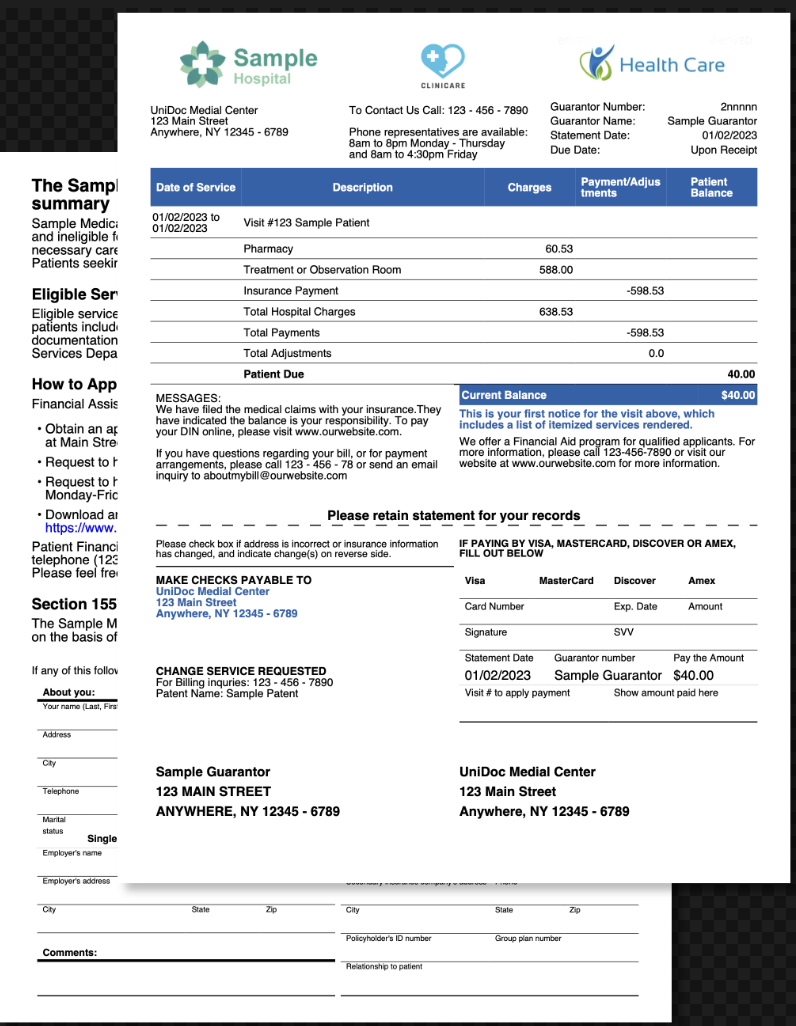
A patient billing statement: provider logos, guarantor details, an itemized service
table and a detachable payment slip. What makes it useful as a reference is how little
Go it needs. There are no registered resources, no helper functions and no header or
footer callbacks - one DrawTemplate call with nil options. Start here if you are
sizing up how much scaffolding a templated document really requires. The
templates overview covers the shared mechanics.
Drawing with nil options
data := map[string]interface{}{
    "institution": map[string]interface{}{
        "name":     "UniDoc Medial Center",
        "address1": "123 Main Street",
        "address2": "Anywhere, NY 12345 - 6789",
    },
    "bill": bill,
}

if err := c.DrawTemplate(mainTpl, data, nil); err != nil {
    log.Fatal(err)
}
DrawTemplate accepts nil for both data and options. Passing nil options is not a
degraded mode: the built-in helpers dict, extendDict, add, array and makeSeq
are always registered, the standard 14 font names always resolve, path() always loads
images and fonts from disk, and hex colors always parse. TemplateOptions is only needed
for things you have to name yourself - your own helper functions, preloaded images and
fonts, a color palette, charts, or subtemplates held in separate files.
That covers a surprising number of business documents. This one uses three images, all one-off:
<table-cell align="center" vertical-align="middle">
    <image src="path('templates/res/hospital_logo.png')" fit-mode="fill-width" margin="0 5"></image>
</table-cell>
ImageMap would be worth the extra code if a logo appeared on every page through a
header callback, since a registered image is decoded once instead of per reference. For
three images drawn once each, path() is less code for the same result.
Mixing map and struct data
The data value is a map[string]interface{} holding both a nested map of literals and
the *Bill decoded from JSON, and the template reaches into both the same way:
{{template "table-cell-paragraph" (extendDict $props "Text" (printf "%s\n%s\n%s" .institution.name .institution.address1 .institution.address2)) }}
{{template "table-cell-paragraph" (extendDict $props "Text" .bill.Guarantor.Number) }}
Note the case difference. .institution.name is a map key, so it is lowercase as
written; .bill.Guarantor.Number is a struct field, so it has to be the exported Go
name, not the JSON tag. Mixing the two in one data value is fine, but a template author
has to know which is which - a wrong map key renders as <no value>, while a wrong
struct field name is an execution error naming the type.
The printf "%s\n%s\n%s" is how the multi-line address block is produced. There is no
line break tag; a newline reaches the parser as character data.
Nested tables for the service list
The itemized table has five columns, and the layout nests a two-column table inside a single cell to line up the guarantor labels and values:
<table-cell>
    <table columns="2">
        {{template "table-cell-paragraph" (extendDict $props "Align" "left" "Text" "Guarantor Number:") }}
        {{template "table-cell-paragraph" (extendDict $props "Align" "right" "Text" .bill.Guarantor.Number) }}
    </table>
</table-cell>
Nesting is unrestricted - <table> is a valid child of <table-cell>, as are
<division>, <paragraph>, <image>, <list> and <chart> - and it is generally
easier than juggling column spans in a single wide table. What you cannot put in a table
cell is a <page-break>, which is valid only directly under the creator or inside a
<chapter>.
Run the example
The Go file is under seventy lines of substance: read the template, read the JSON, draw,
write. All the layout is in templates/main.tpl, whose simple-paragraph and
table-cell-paragraph definitions account for most of the page.
git clone https://github.com/unidoc/unipdf-examples.git
cd unipdf-examples/templates/medical-bill
go run pdf_medical_bill.go
If this is your first time using UniPDF, follow the getting started guide to create an API key and set up your development environment.
View the full source
Sample output