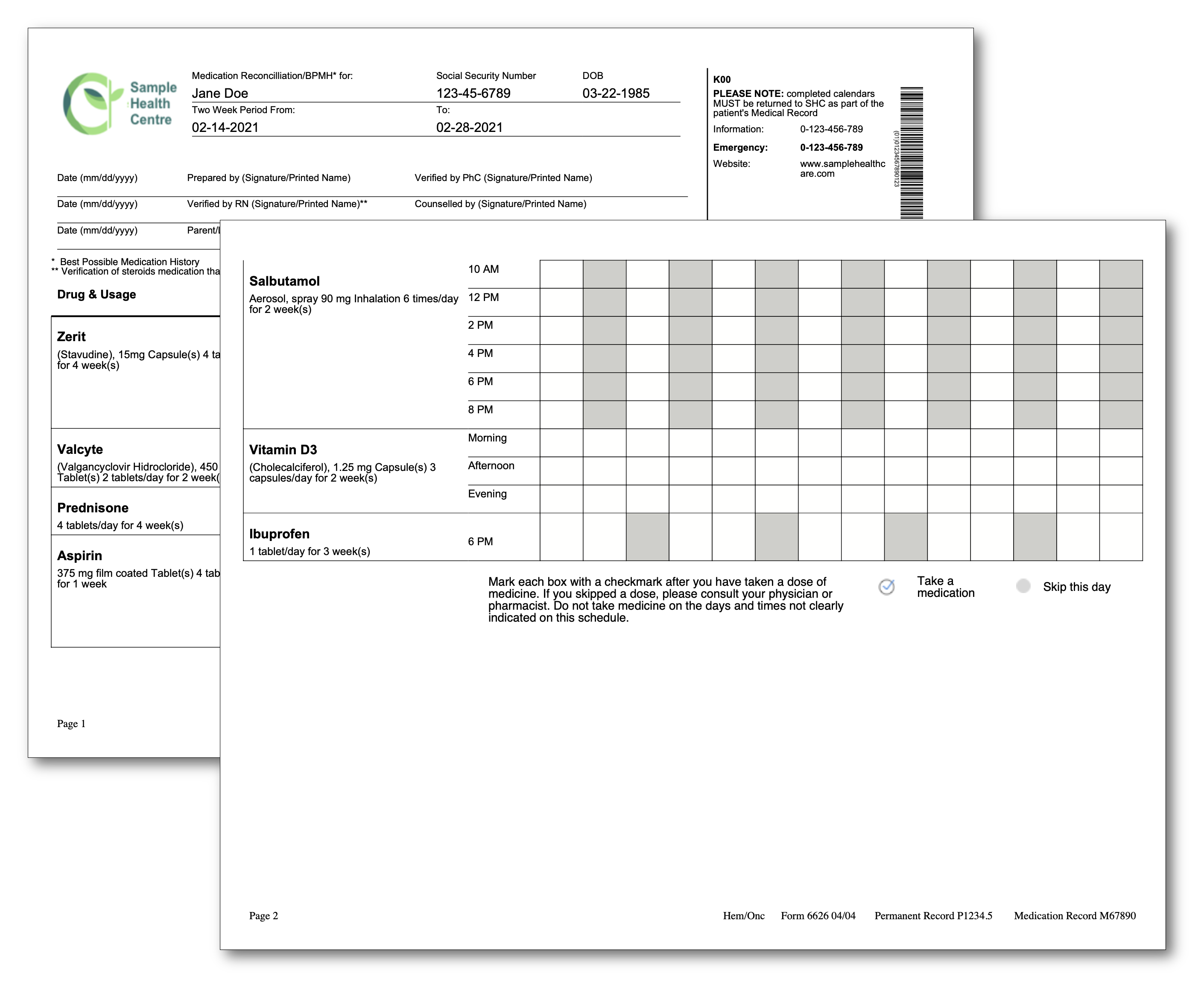
Medication Schedule Report
A medication administration record: one row per drug, a column per day of the schedule, and a checkbox in every cell. The column count depends on the data, which is the problem this example solves - the creator wants column widths as fractions summing to one, and you do not know how many columns there are until you have read the JSON. The templates overview covers the shared mechanics.
Computing column widths from the data
column-widths takes one fraction per column, so a table with a data-dependent shape
needs its widths generated. A helper divides the available fraction evenly:
"getColumnWidths": func(numOfCols int, colWidth float64) string {
    var widths string
    width := colWidth / float64(numOfCols)
    for i := 0; i < numOfCols; i++ {
        s := fmt.Sprintf("%.4f", width)
        if i == numOfCols-1 {
            widths += s
        } else {
            widths += (s + " ")
        }
    }
    return widths
},
The template calls it inside the attribute, after two fixed columns:
<table columns="16" margin="10 0 0 0" column-widths="0.25 0.08 {{getColumnWidths (len .ListOfDays) 0.67}}" enable-page-wrap="true" enable-row-wrap="true">The drug name gets 25 percent, the time column 8 percent, and the remaining 67 percent is split across the day columns. The attribute is parsed by splitting on whitespace, so the helper only has to produce space-separated numbers; a value that does not parse becomes zero rather than an error.
The columns="16" is still hard-coded, so it and the length of ListOfDays have to
agree, and the failure mode is quiet. Table.SetColumnWidths rejects a list whose length
does not match the column count, but the template processor discards that error, so the
table falls back to equal-width columns with only a debug log to say why. If the schedule
length is genuinely variable, generate the column count from the same value:
columns="{{add 2 (len .ListOfDays)}}".
Page and row wrapping
The schedule is longer than a page, and both wrapping switches are on:
| Attribute | Effect |
|---|---|
enable-page-wrap="true" | Default. The table is split at the page boundary instead of moving whole. |
enable-row-wrap="true" | A row that does not fit is split at the boundary rather than moved to the next page. |
Row wrapping is off by default, and it applies only to rows whose cells hold styled paragraph content - a row of images will not split whatever you set. The table row wrap guide covers the behavior in detail. Here it keeps a drug whose description runs long from being pushed to the next page whole.
Header rows are a separate matter. The processor exposes header-start-row and
header-end-row, and both must be present and non-zero for Table.SetHeaderRows to be
called at all - setting only one is silently discarded. Rows are 1-based, so
header-start-row="1" header-end-row="2" repeats the first two rows on every page. This
example does not use them; a long schedule generally should.
Fonts, and the footer that does not need them
Arial regular and bold are loaded from TTF files and registered:
tplOpts := &creator.TemplateOptions{
    FontMap: map[string]*model.PdfFont{
        "arial-bold": arialBold,
        "arial":      arial,
    },
    HelperFuncMap: template.FuncMap{
        "getColumnWidths": func(numOfCols int, colWidth float64) string { /* ... */ },
    },
}
The footer, though, is drawn with nil options:
c.DrawFooter(func(block *creator.Block, args creator.FooterFunctionArgs) {
    tpl, err := readTemplate("templates/footer.tpl")
    if err != nil {
        log.Fatal(err)
    }

    data := map[string]interface{}{
        "PageNum":               args.PageNum,
        "FormNumber":            medicationData.FormNumber,
        "PermanentRecordNumber": medicationData.PermanentRecordNumber,
        "MedicationRecord":      medicationData.MedicationRecord,
    }
    if err := block.DrawTemplate(c, tpl, data, nil); err != nil {
        log.Fatal(err)
    }
})
That works only because footer.tpl asks for font="times", a standard 14 name that
resolves without a map. Change it to font="arial" and the footer would quietly render
in the creator’s default font instead, since an unresolved font name falls back rather
than erroring. If a header or footer is meant to match the body, pass it the same
options.
Page setup
size := creator.PageSize{279.4 * creator.PPMM, 215.9 * creator.PPMM}
c.SetPageSize(size)
c.SetPageMargins(20, 20, 35, 35)
creator.PPMM converts millimeters to PDF points, so this is US Letter turned landscape,
which the sixteen-column grid needs. The 35 point bottom margin is the height of the
footer block, since a footer callback’s block is exactly as tall as the bottom margin.
Run the example
The wide table near the end of templates/main.tpl is the schedule; table-header and
drug-schedule above it render the column labels and one drug row. getColumnWidths in
the Go file is the only helper.
git clone https://github.com/unidoc/unipdf-examples.git
cd unipdf-examples/templates/medication-schedule-report
go run pdf_medication_schedule.go
If this is your first time using UniPDF, follow the getting started guide to create an API key and set up your development environment.
View the full source
Sample output