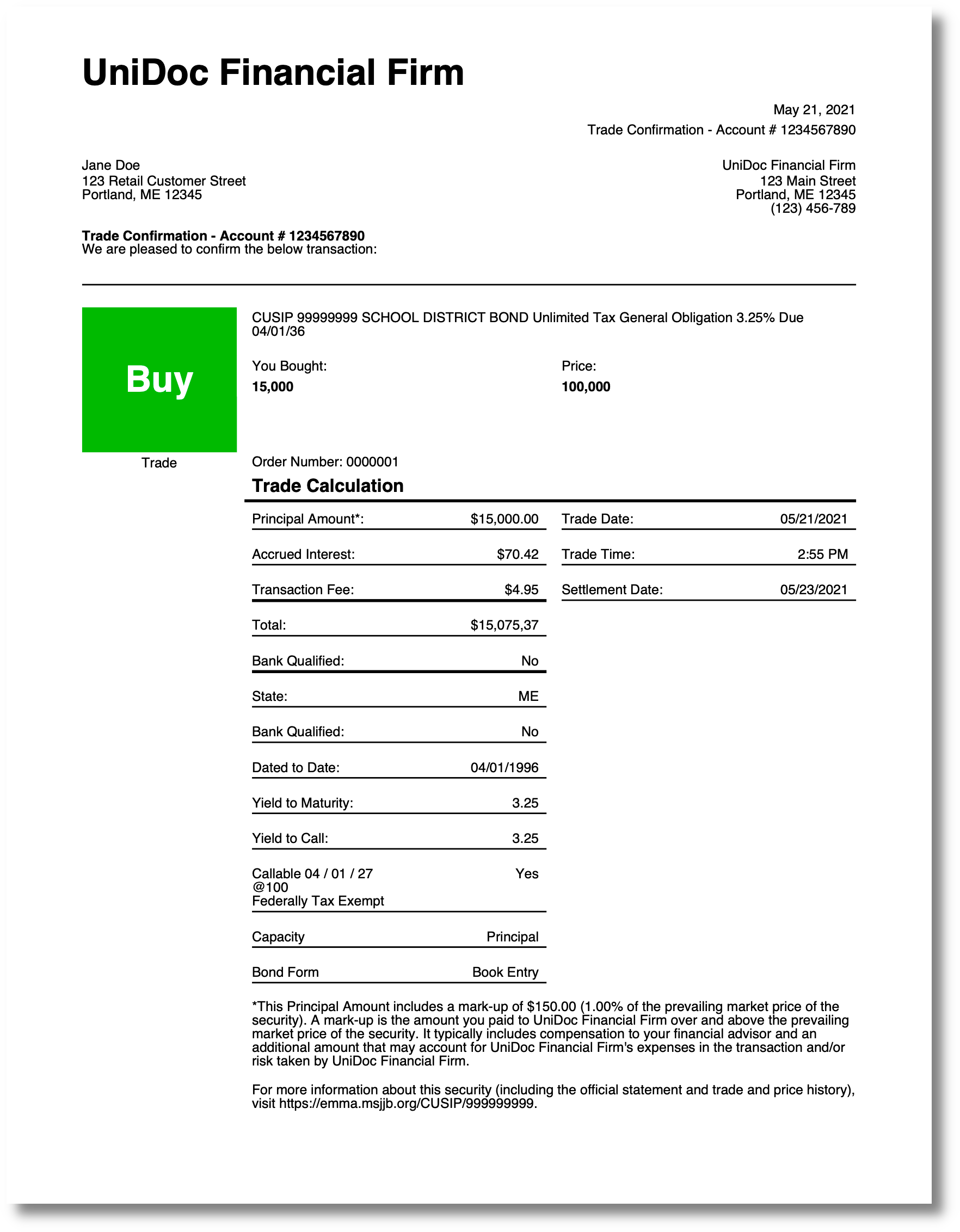
Trade Confirmation
A brokerage trade confirmation: firm and account header, trade description, a calculation
panel of paired labels and values, and the regulatory footnotes. There are no images,
fonts or charts to register, so DrawTemplate gets nil options - the layout is pure
table nesting. The templates overview covers the shared mechanics.
Nested tables instead of column spans
The calculation panel is a grid of label/value pairs interleaved with horizontal rules, which would be awkward in one wide table. Instead a two-column table lives inside a cell of the outer one, and a subtemplate emits one row of it:
{{define "calculation-entry"}}
    <table-cell>
        <paragraph>
            <text-chunk font="helvetica" font-size="9" color="#000000">{{.CalcLabel}}</text-chunk>
        </paragraph>
    </table-cell>
    <table-cell>
        <paragraph>
            <text-chunk font="helvetica" font-size="9" color="#000000">{{.CalcValue}}</text-chunk>
        </paragraph>
    </table-cell>
    <table-cell colspan="2">
        <line position="relative" fit-mode="fill-width" thickness="{{.LineThickness}}" margin="0 0 0 0"></line>
    </table-cell>
{{end}}
Each call fills three cells of a two-column table: label, value, then a full-width rule.
The rule cell uses colspan="2" rather than being a separate table, which keeps the pair
and its underline in one flow. A subtemplate emitting more cells than the table has
columns is normal - the table wraps to the next row on its own.
<line> with position="relative" and fit-mode="fill-width" is how a rule that spans
its container is drawn. Absolute positioning with x and y is available but not what
you want inside a table, where the cell’s position is not known when the markup is
written.
Multi-line values
The firm address is one data value containing newlines, assembled in Go:
data := map[string]interface{}{
    "firmName":    "UniDoc Financial Firm",
    "firmAddress": "123 Main Street\nPortland, ME 12345\n(123) 456-789",
    "trade":       trade,
}
and the calculation labels do the same inside the template:
{{template "calculation-entry" dict "LineThickness" 1 "CalcLabel" (printf "Callable %s\nFederally Tax Exempt" .trade.Calculation.Callable) "CalcValue" .trade.Calculation.TaxExcempt }}There is no line break tag. A newline has to arrive as character data, whether it comes
from a Go string, from printf in the template, or from the XML entity 
 written
directly in the markup. All three appear across these examples.
No options at all
if err := c.DrawTemplate(mainTpl, data, nil); err != nil {
    log.Fatal(err)
}
Every font attribute names helvetica or helvetica-bold, both standard 14 fonts that
resolve without a FontMap. All colors are hex literals, which parse without a
ColorMap. The subtemplates are {{define}} blocks in the same file, so there is no
SubtemplateMap. And the only helpers used - dict and extendDict - are built in and
always available.
If you add a resource later, remember that a bad name does not fail uniformly: an
unresolved font or color falls back silently, to the default regular font and to black
respectively, while an unresolved image or chart name makes DrawTemplate return an error.
Run the example
main reads the template and trade.json, merges in the firm details, and draws once.
The calculation-entry definition at the top of templates/main.tpl accounts for most of
the second half of the page.
git clone https://github.com/unidoc/unipdf-examples.git
cd unipdf-examples/templates/trade-confirmation
go run pdf_trade_confirmation.go
If this is your first time using UniPDF, follow the getting started guide to create an API key and set up your development environment.
View the full source
Sample output