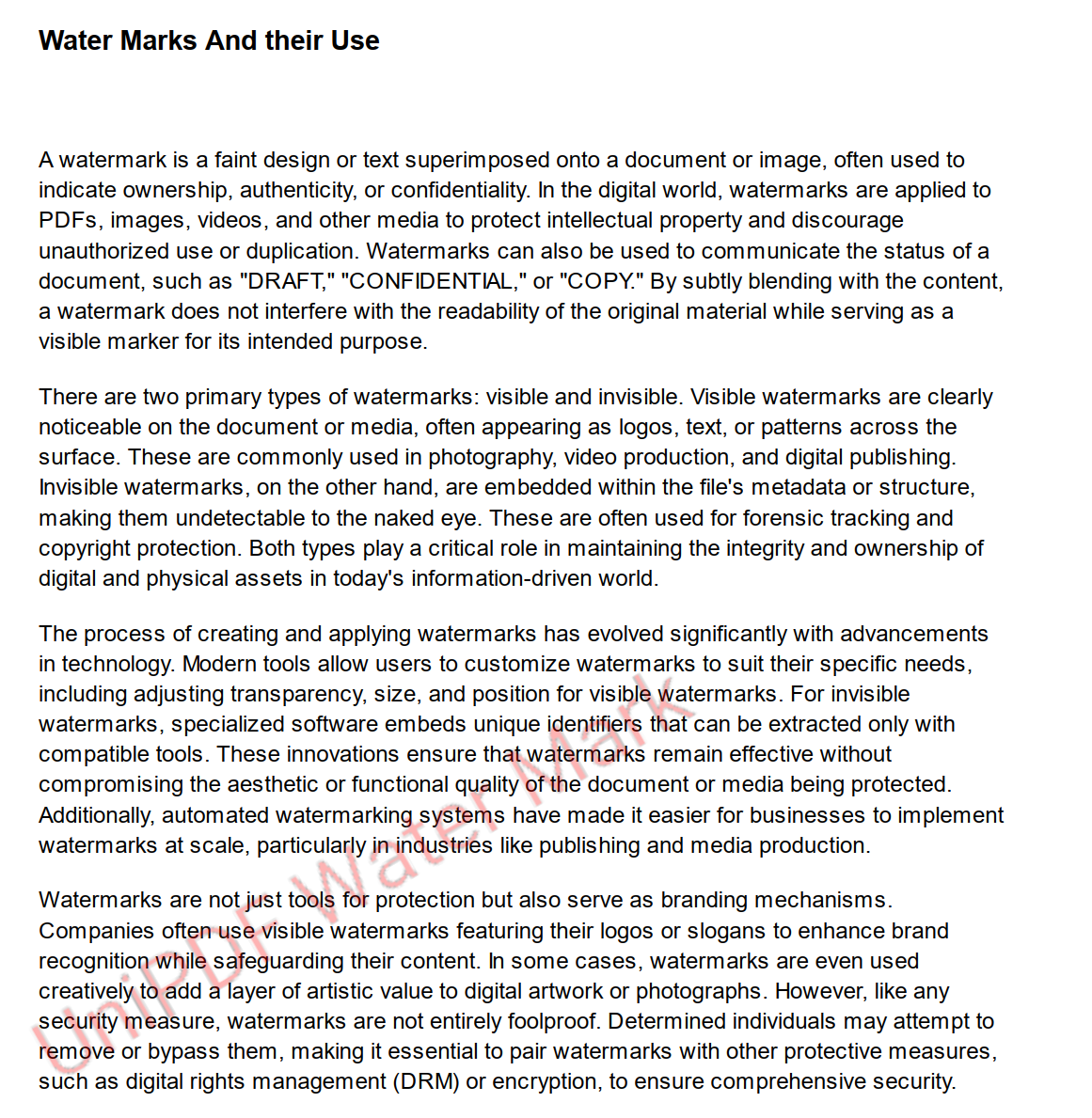
Add Text Watermark
PdfPage.AddWatermarkText stamps a line of text across a page at a chosen angle and
opacity. It’s the shortest route to a “DRAFT” or “CONFIDENTIAL” overlay: one call per
page, no layout work, and the existing page content is left untouched underneath.
The text is rasterized, not typeset. UniPDF renders it into a PNG with FreeType and embeds that as an image, so the watermark is a bitmap on the page. That has real consequences, covered under limitations.
Doing it
options := model.WatermarkTextOptions{
    Alpha:     0.3,
    FontSize:  40,
    FontPath:  "Roboto-Regular.ttf",
    FontColor: color.RGBA{R: 255, G: 0, B: 0, A: 255},
    Angle:     30,
}

if err := page.AddWatermarkText("CONFIDENTIAL", options); err != nil {
    return err
}
The call modifies the page in place and writes nothing. Collect the watermarked pages
with a creator’s AddPage and call c.WriteToFile, or convert the reader with
pdfReader.ToWriter(nil).
The options
| Field | Default | Effect |
|---|---|---|
FontPath | none, required | Path to a .ttf file, loaded and parsed by FreeType. |
Alpha | 0.5 | Opacity, written to the graphics state as both ca and CA. |
FontSize | 20 | Rasterization size in points, at 72 DPI. |
FontColor | black | A color.Color. Its alpha channel is ignored. |
Angle | 0 | Rotation in degrees, applied to the image as a whole. |
FontPath is the only mandatory field, and it is a TrueType file path rather than a
UniPDF PdfFont. The standard 14 fonts, a font already embedded in the document and
a composite font are all unavailable here; you need a .ttf on disk.
Alpha cannot be set to 0. A zero value is treated as unset and replaced with 0.5,
so the smallest opacity you can ask for is a small nonzero number like 0.01.
FontColor’s alpha channel is discarded during rasterization, which is why
color.RGBA{R: 255, A: 1} still comes out solid red rather than nearly invisible.
Control transparency with Alpha.
The watermark is always centered and always scaled with its aspect ratio preserved.
AddWatermarkText calls AddWatermarkImage with FitToWidth: false and
PreserveAspectRatio: true hard-coded, so those two knobs are not reachable from
here.
Limitations
Because the text is rasterized, it isn’t selectable, isn’t found by search, isn’t
extracted by the text extractor, and doesn’t scale cleanly when the page is zoomed or
printed at high resolution. A larger FontSize produces a larger bitmap, which is
the only lever on quality.
The canvas the text is drawn on is sized by estimate: character count times font
size, clamped to the media box width. The estimate is generous, so short text sits in
a wide mostly-empty bitmap, which is why a watermark often looks smaller and further
right than the font size suggests. Once the estimate exceeds the page width the clamp
takes over and glyphs past that edge are cut off rather than the text being shrunk to
fit. Fewer characters at a larger FontSize is the way to fill a page.
Newlines in the text produce multiple lines, spaced at 1.5 times the font size. Tabs become four spaces and carriage returns are dropped.
An empty string returns “no text set” and an empty FontPath returns “no font path
set”. Anything wrong with the font file itself, missing or not parseable as TrueType,
surfaces as an error from the same call.
Calling AddWatermarkText twice on the same page adds two watermarks. Nothing detects
or replaces an existing one.
Run the example
The example watermarks every page of an input document with a string given on the
command line and writes the result through a creator. Everything happens in main.
The Roboto-Regular.ttf shipped in the watermarks folder is what FontPath points
at, so run it from that directory.
git clone https://github.com/unidoc/unipdf-examples.git
cd unipdf-examples/watermarks
go run pdf_add_text_watermark.go <input.pdf> <watermark text> <output.pdf>
If this is your first time using UniPDF, follow the getting started guide to create an API key and set up your development environment.
View the full source
Sample output